
 In my email server tutorials, I always use a VPS with open port 25 so that I can send emails.
In this article, I will share ten reputable VPS providers (which I’ve tested personally and or contacted their respective support) known for their open port 25 capabilities and are the best VPS for email servers:
| VPS Provider | Port 25 Open | Sending Limit | rDNS | IPv6 |
| isHosting | ☑️ | No Limits | ✔️ | ✔️ |
| RDP Monster | ☑️ (Add-on) | No Limits | ✔️ | ❌ |
| EUGameHost | ☑️ | No Limits | ✔️ | ❌ |
| EukHost | ☑️ | No Limits | ✔️ | ✔️ |
| RackNerd | ☑️ | No Limits | ✔️ | LA/FR |
| UltaHost | ☑️ | No Limits | ✔️ | ✔️ |
| Contabo | ☑️ | 25 Emails/Minute | ✔️ | ✔️ |
| CloudBlast | ☑️ | No Limits | ✔️ | ✔️ |
| AvaHosting | ☑️ | No Limits | ✔️ | ✔️ |
| Hostinger | ☑️ | 5 Emails/Minute | ✔️ | ✔️ |
Understanding Ports 25, 587, and 465
Ports 25, 587, and 465 are essential components of the Simple Mail Transfer Protocol (SMTP) and Secure Sockets Layer (SSL)/Transport Layer Security (TLS) protocols. These ports play crucial roles in the transmission and security of email communications:
- Port 25: Standard SMTP port for email transmission.
- Port 587: Submission port for email clients to send messages securely.
- Port 465: Deprecated SSL/TLS port for SMTP over SSL.
Now, let’s explore the features of the VPS providers with an open port 25. Not sure if your VPS has open port 25? Check it using this tool.
Note: Servers will automatically open port 25 once an application (e.g., mailcow) that requires open port 25 is installed.
Best VPS with Open Port 25
My top 10 best VPS for email servers! Note that these providers may change their email policy without notification.
1. isHosting (Unlimited Outbound Sending)

If you’re looking for a reliable VPS provider with flexible plans, global reach, and a wide array of features, ishosting is worth considering.
Below is a breakdown of what makes iShosting’s VPS services stand out — including port 25 availability, supported payment methods, and core VPS features.
Watch my step-by-step setup of isHosting VPS in Dallas.
Port 25 Access
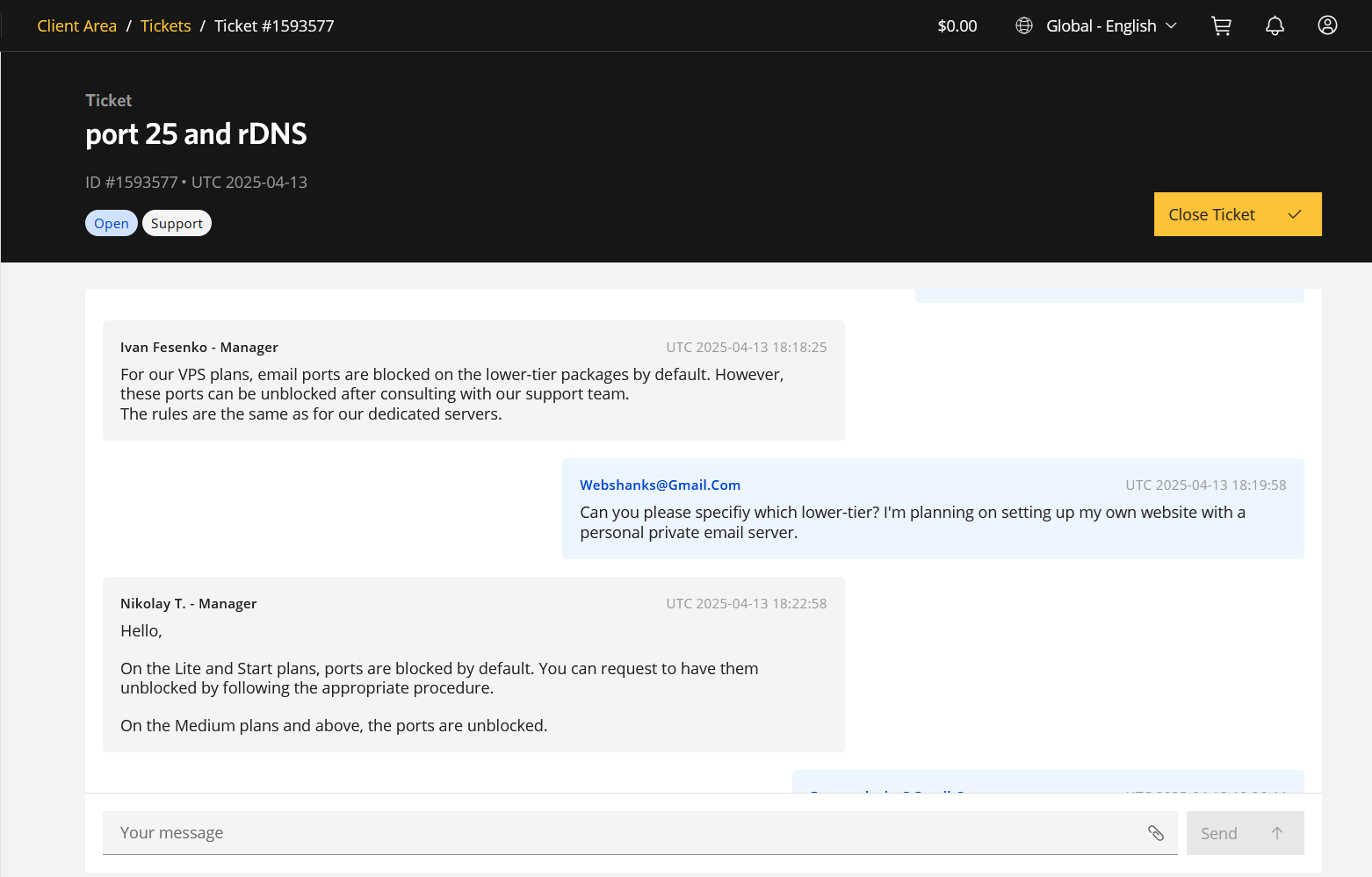
isHosting controls port 25 access based on your plan level:
-
Lite and Start Plans: Port 25 is blocked by default to reduce the risk of spam. However, users can request to have it unblocked by completing KYC (Know Your Customer) verification and maintaining a balance that covers at least 3 months of service.
-
Medium Plan and above: Port 25 is open by default, making these plans better suited for email servers and applications requiring unrestricted SMTP traffic.
Global Availability
Data Centers in 30+ Countries: Including locations in Europe, Asia, North and South America, and Oceania, allowing you to choose a server location closest to your target audience for optimal performance.
Key Features
- Open ports 25, 465 and 587
-
Full Root Access
- IPv6: You can get IPv6 upon request via support
-
Operating System Choices: Support for various Linux distributions (Ubuntu, Debian, AlmaLinux, CentOS, Rocky Linux) and Windows versions.
-
Control Panels: Compatibility with ispmanager, DirectAdmin, HestiaCP, aaPanel, Fast Panel, and more.
-
CMS Support: Easy installation of popular CMS platforms like WordPress, Joomla, and Drupal.
-
Free DDoS Protection: Standard protection is available for servers in the Netherlands.
-
24/7 Technical Support: Assistance available via chat and ticket system.
-
Project Migration: Free migration services to transfer your existing projects to iShosting VPS.
-
Monitoring and Recovery
Payment Methods
isHosting offers extensive payment flexibility, supporting both traditional and alternative methods. These include:
-
Bank Cards: Visa, Mastercard
-
Cryptocurrencies: Bitcoin and others
-
E-wallets: WebMoney, QIWI, Yandex Money, Capitalist.net, AdvCash, PAYEER, PerfectMoney, One Wallet
-
Bank Transfers: Wire Transfer, Sberbank RF, Ukrainian Bank, Russian Bank, and more
-
Other: PayPal (via request), Payoneer (on request), LiqPay, Alfa Click, Telemoney, terminals in Russia/Ukraine, and many local options
If your preferred payment method isn’t listed, iShosting encourages reaching out to support for custom arrangements.
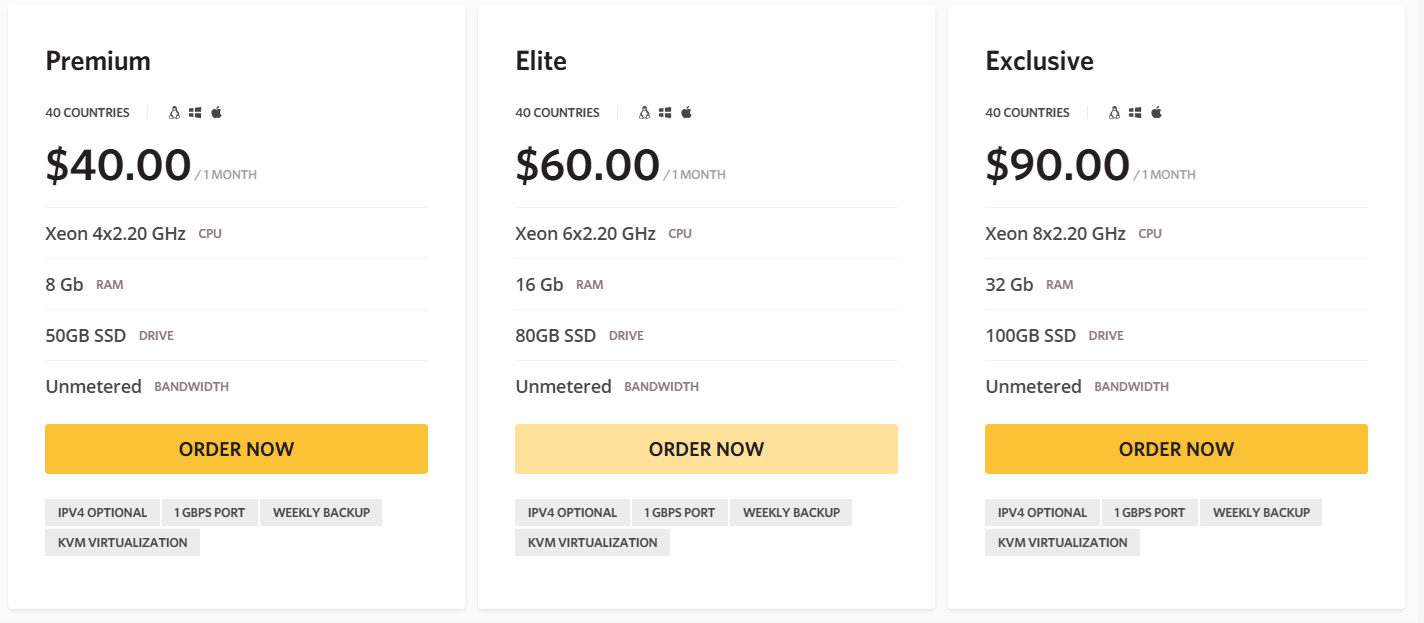
ishosting VPS Plans

2. RDP Monster (Unlimited Outbound Sending)

RDP Monster is a low-cost VPS and RDP hosting provider known for fast provisioning, flexible payments, and privacy-friendly ordering. One feature that makes it stand out—especially for email server users—is its paid Open Port 25 option.
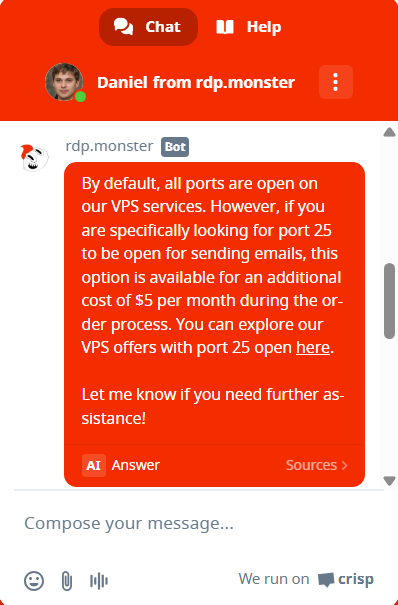
Open Port 25 (SMTP)
By default, port 25 is blocked, which is standard across most VPS providers to reduce spam abuse. However, RDP Monster allows you to open port 25 for an additional $5 fee.
⚠️ As with any VPS provider, opening port 25 means you are responsible for proper mail configuration, IP reputation, and avoiding spam-related abuse or blacklisting.
Key Features
- Open ports 25, 465 and 587
- Instant VPS / RDP activation after payment
- Root / Administrator access on Linux VPS and Windows RDP
- NVMe SSD storage on most plans
- High bandwidth allocations (often advertised as unlimited or generous caps)
- Multiple locations (varies by plan)
- No heavy KYC / verification, appealing to privacy-focused users
Payment Methods
RDP Monster supports a wide range of payment options, including:
- Cryptocurrency (XMR and all cryptos)
- USDT (TRC20)
- Coinbase Commerce
- Stripe (Credit card)
- Capitalist (WebMoney, Qiwi, YooMoney, Cards : RU, UAH, KZT…)
This flexibility is a big plus for international users and crypto-friendly buyers.
RDP Monster is a solid choice if you need a budget VPS with the option to open port 25, especially for testing or running self-hosted email servers. The $5 port-25 add-on is reasonable compared to providers that block SMTP entirely, but users should still follow best practices for email security and warm-up.
Take note that their support is through chat and Telegram.
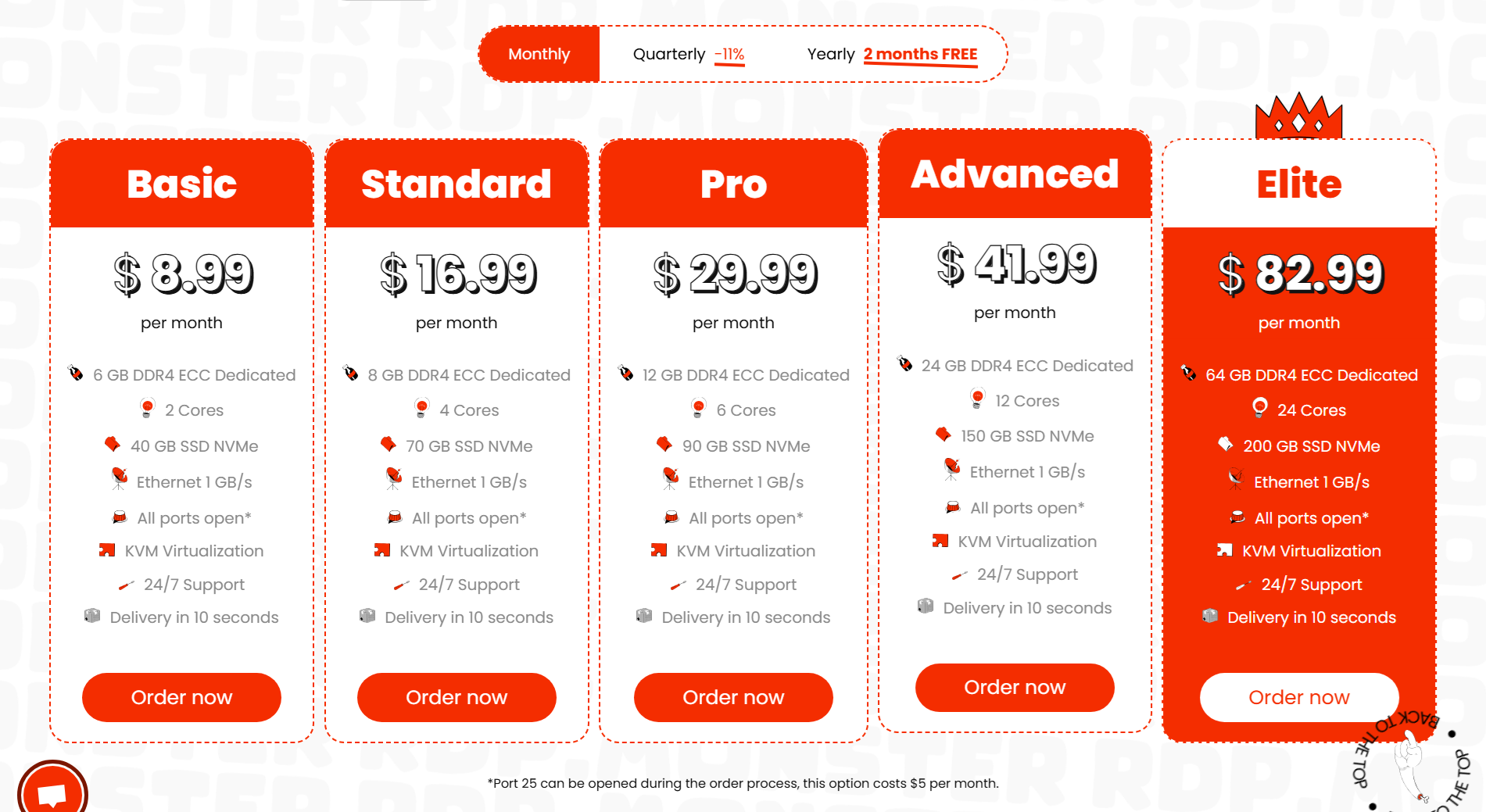
RDP Monster VPS Plans
3. EUGameHost (Unlimited Outbound Sending)
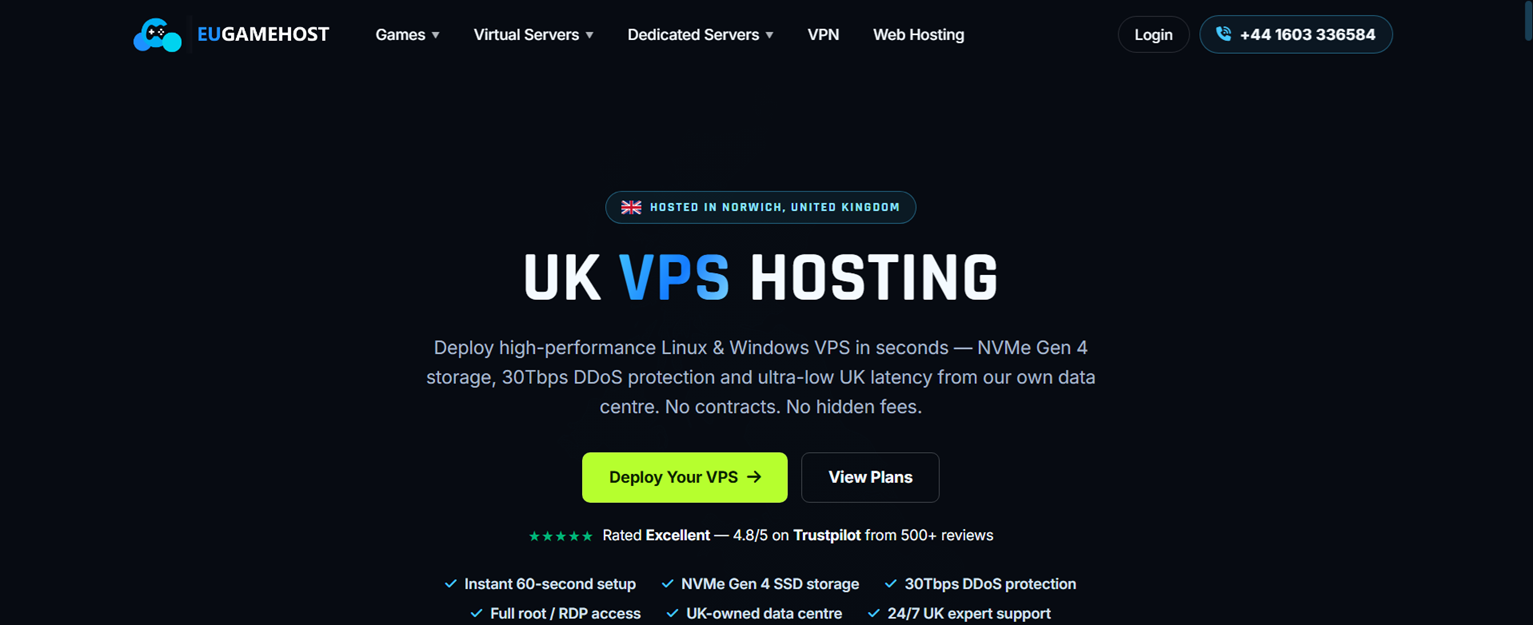
EUGameHost is a UK-based VPS provider offering affordable virtual servers designed for gaming servers, applications, websites, and self-hosted projects. Their VPS plans come with full root access, NVMe storage, DDoS protection, and flexible server management options.
For users looking to run their own email infrastructure, one important feature is SMTP port 25 availability. Port 25 is the standard port used for mail server-to-mail server communication, which makes it necessary when hosting your own SMTP server using platforms like Mailcow, iRedMail, Postfix, Mail-in-a-Box, or similar self-hosted email solutions.
EUGameHost VPS servers are suitable for self-hosted email setups because they provide full server control, allowing users to configure their own mail stack, firewall rules, DNS records, and mail services. Their VPS offering includes root access and firewall management through their control panel, giving users the flexibility needed for custom server deployments.
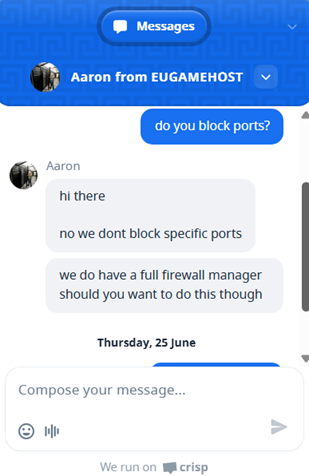
As with any VPS provider offering SMTP access, users should configure proper email authentication including SPF, DKIM, DMARC, and reverse DNS (PTR) records to improve deliverability and protect IP reputation.
EUGameHostl Networks VPS Features
-
Port 25 SMTP support for self-hosted mail servers
-
Full root access for installing Postfix, Mailcow, iRedMail, and other mail platforms
-
UK-based VPS infrastructure with NVMe storage
-
DDoS protection included
-
Fast deployment and VPS management tools
-
Supports Linux operating systems commonly used for mail servers
Payment Methods Accepted
EUGameHost supports multiple payment options, making it easier for customers worldwide to purchase VPS and hosting services. Available payment methods include:
- 💳 Visa / Mastercard
- 💰 PayPal
- ₿ Cryptocurrency
- 🏦 Bank Transfer
These payment options provide flexibility for users who prefer traditional card payments, online payment platforms, or crypto-based transactions.
For VPS customers, payments are handled through EUGameHost’s automated billing system. Services are paid in advance, and users are responsible for keeping their billing details updated to avoid service suspension.
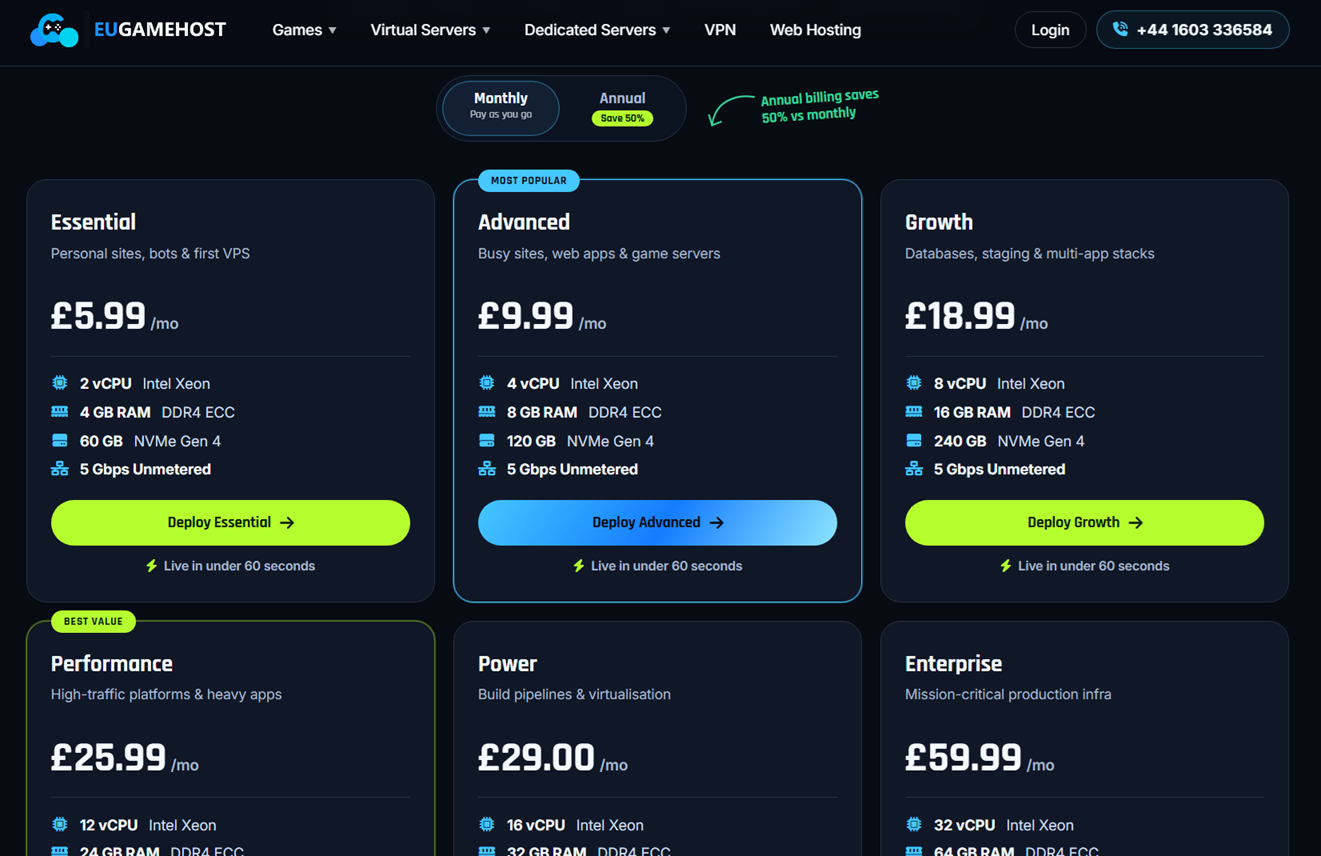
EUGameHost VPS Plans
4. EukHost (Unlimited Outbound Sending)
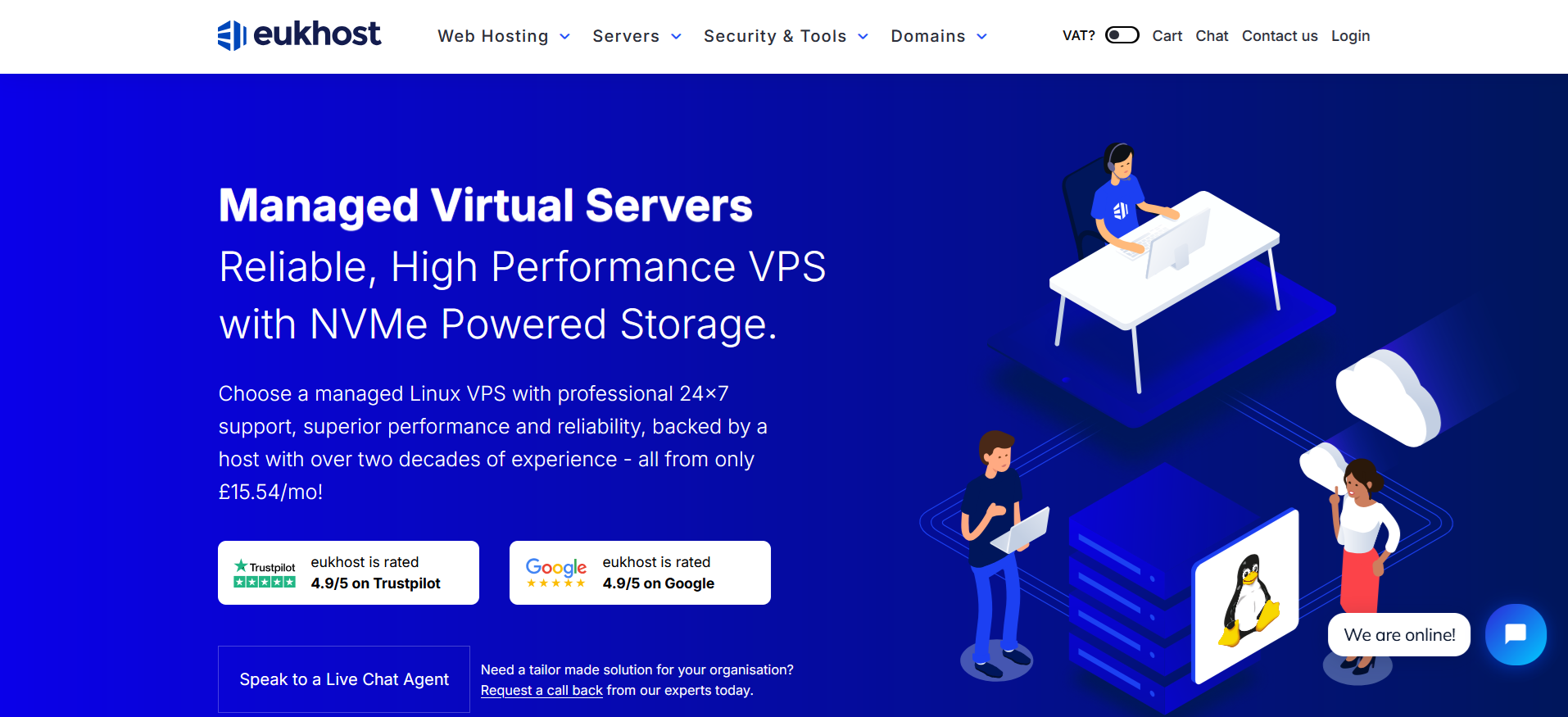
eUKhost is a UK-based hosting provider offering managed VPS hosting for websites, applications, development environments, and email servers. One reason eUKhost deserves a place on my list of VPS providers with open port 25 is that the company does not block server ports by default.
Unlike many budget VPS providers, eUKhost focuses heavily on managed hosting and technical support. This makes it a suitable option for beginners, businesses, and website owners who want help managing their servers.
Does eUKhost Block Port 25?
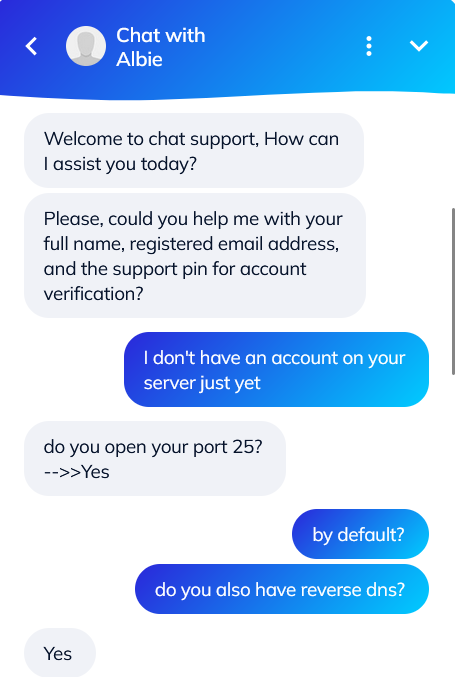
According to the information provided by eUKhost chat support, its VPS servers do not have ports blocked by default. This includes SMTP port 25, which is required when an email server needs to communicate directly with other mail servers.
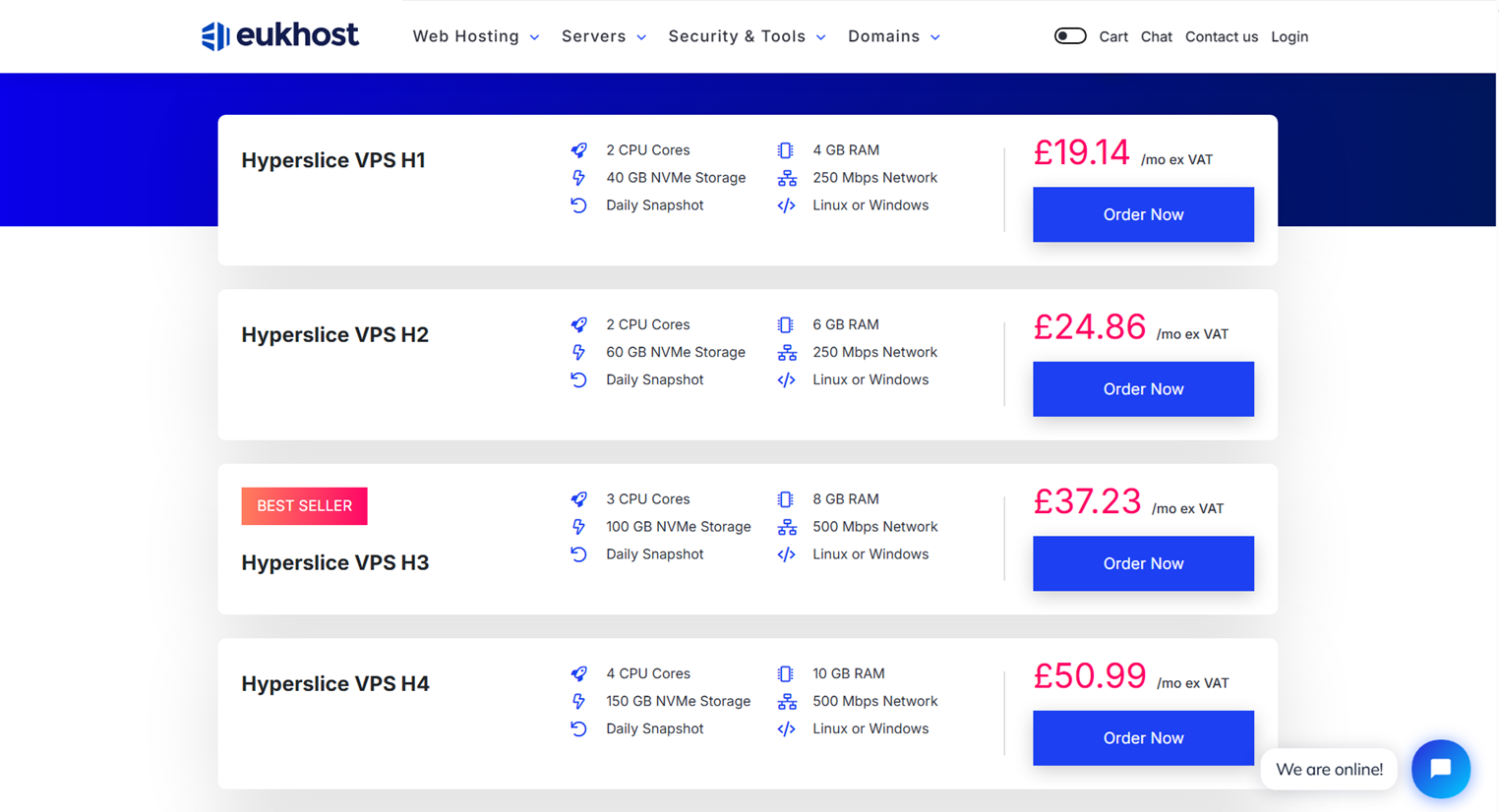
eUKhost VPS Plans
The entry-level Hyperslice VPS H1 currently starts at £19.14 per month excluding VAT and includes:
- 2 CPU cores
- 4 GB ECC RAM
- 40 GB NVMe storage
- 250 Mbps network connection
- Daily snapshots with three-day retention
- Linux or Windows operating system options
Higher plans provide additional CPU cores, RAM, NVMe storage, and faster network connectivity. For example, the H3 plan includes 3 CPU cores, 8 GB RAM, 100 GB NVMe storage, and a 500 Mbps connection.
Prices can change, so check the official eUKhost VPS page for the latest plans and VAT-inclusive pricing.
VPS Features
eUKhost includes several useful features across its VPS range:
- Full root access on eligible VPS configurations
- Enterprise-class NVMe SSD storage
- Intel Xeon processors
- Daily snapshots
- Linux and Windows operating systems
- Optional cPanel, Plesk, or Enhance control panels
- UK-based data centers
- 24/7 support through chat, telephone, and tickets
- Free website migration
- Scalable CPU, RAM, and storage
- 30-day money-back guarantee
The VPS can also be ordered without a control panel, which is usually the best configuration for Docker-based mail servers such as Mailcow or Mailu.
Payment Methods Accepted by eUKhost
eUKhost accepts the following payment methods:
- Credit cards
- Debit cards
- PayPal
- Domestic UK bank transfers
- International bank transfers
Supported cards include Visa, Mastercard, American Express, Discover, JCB, and Diners Club. Bank-transfer payments must be made in British pounds, and international customers may be responsible for conversion and transfer fees. International transfers may also take longer to appear in the customer account.
5. RackNerd (Unlimited Outbound Email)

RackNerd stands out with its robust VPS solutions. With open port 25, it enables seamless email communication, ensuring that your messages reach your audience effortlessly.
With this hosting provider, I’ve built Mail-in-a-Box and mailcow email servers to send and receive emails to name a few.
You can also watch how I setup mailcow in CloudPanel with RackNerd.
The company boasts high-performance infrastructure, SSD-powered storage, and DDoS protection, ensuring a secure and reliable email marketing environment. Their user-friendly control panel simplifies server management, making it an excellent choice for both beginners and experienced users.
Limited time offer : Get a 5GB KVM VPS for only $55.93/Year!Features
- Full root access.
- Multiple data center locations for enhanced global reach.
- SSD storage for improved performance.
- DDoS protection to safeguard against potential threats.
- Root access for greater control over server configurations.
- Open 25, 587 ports

Resource Flexibility: RackNerd provides VPS plans with customizable resources, allowing users to tailor their server specifications to meet specific needs.
Multiple Operating Systems: Users can choose from various operating systems, including popular Linux distributions and Windows, providing flexibility for different applications and software.
SolusVM: RackNerd offers a user-friendly control panel, making it easy for customers to manage their VPS. This is particularly beneficial for those who may not have advanced technical knowledge. (I hope they’ll upgrade it to SolusVM 2).
Network Uptime Guarantee: RackNerd is known for its commitment to uptime, backed by a robust Service Level Agreement (SLA) that ensures high availability.
Payment Methods
- Credit/Debit Cards (Visa, MasterCard)
- PayPal
- Bank Transfers
- Cryptocurrency
- Boleto
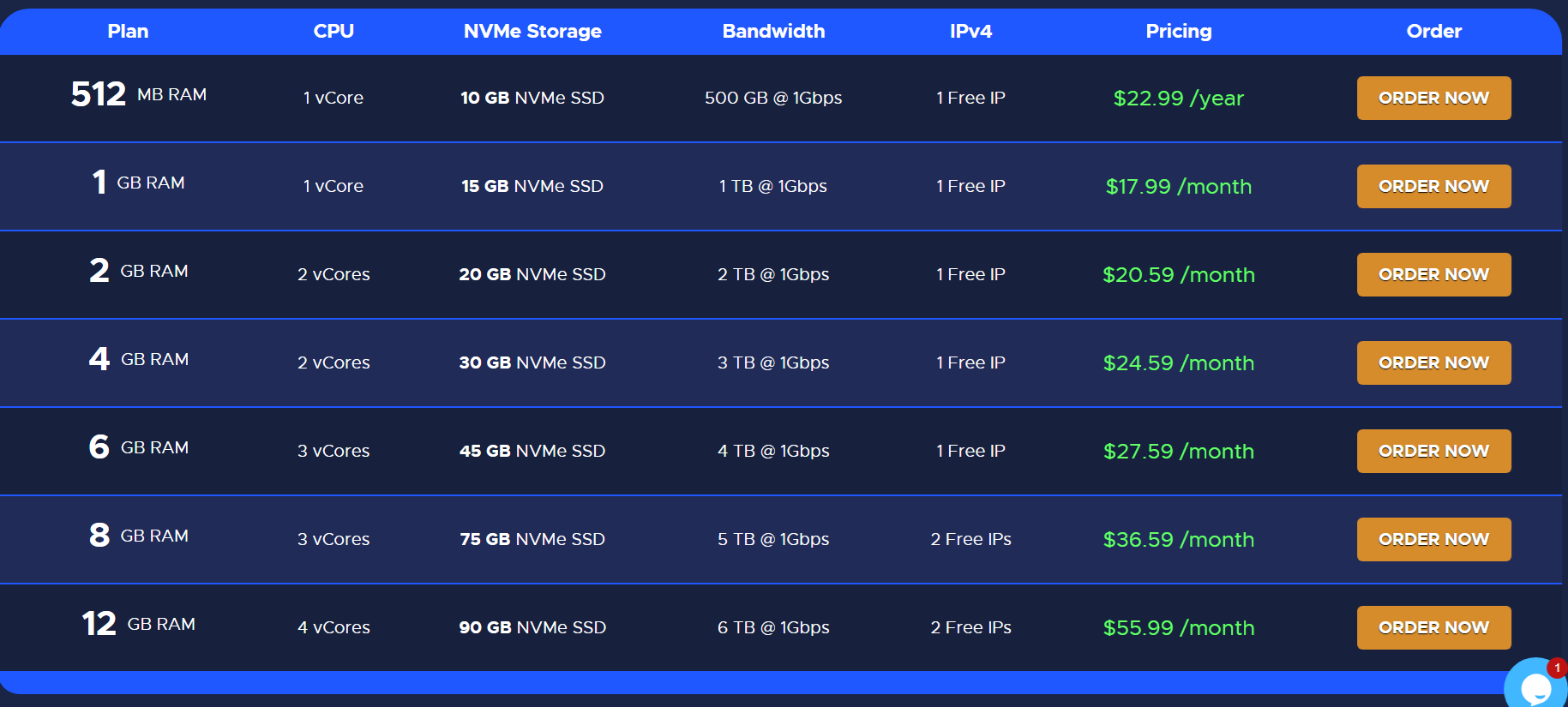
RackNerd KVM Virtual Private Server Plan
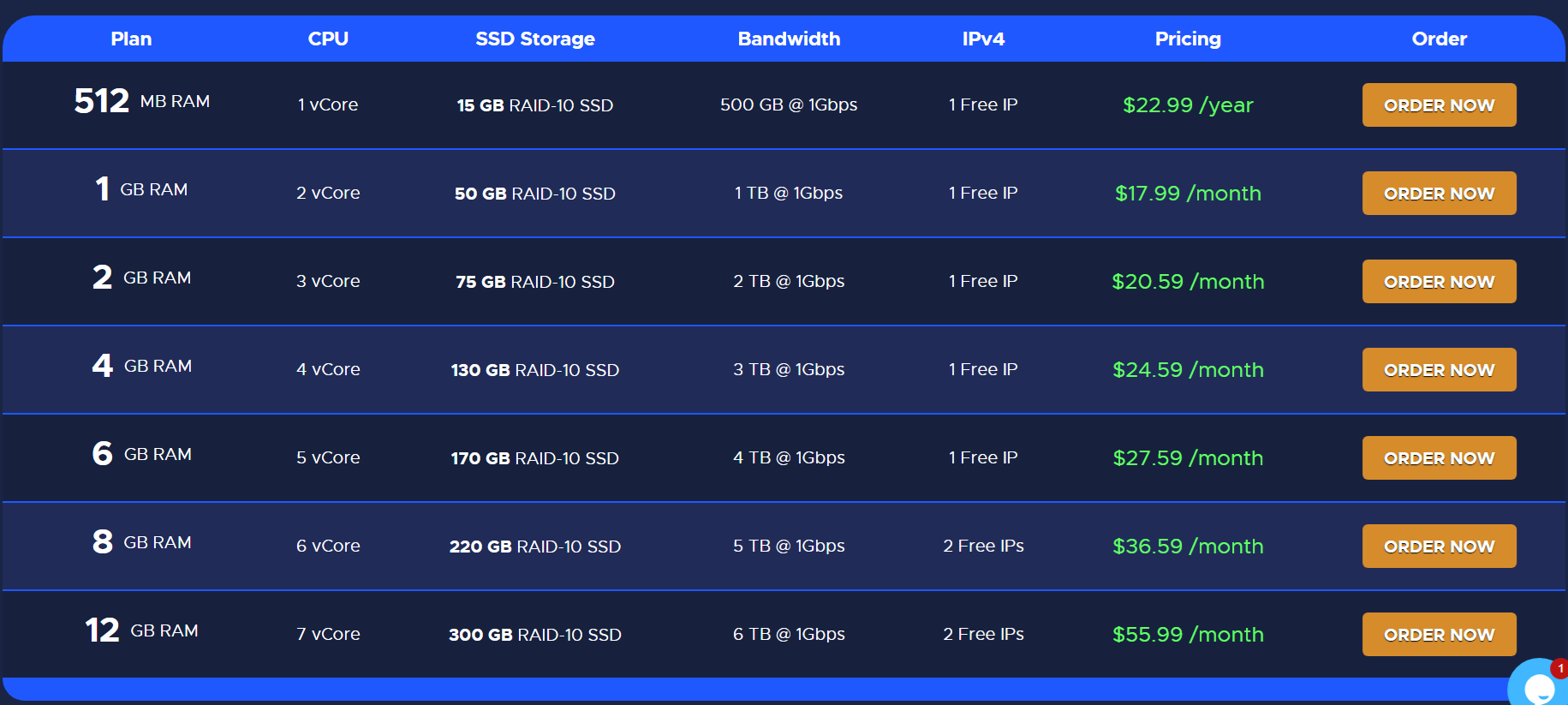
RackNerd AMD Ryzen Linux VPS with NVMe SSD
6. UltaHost (Unlimited Outbound Emails/Hour)
 UltaHost offers Virtual Private Servers (VPS) with various features, plans, and data center locations. One key aspect of their VPS offerings is the availability of port 25, which is essential for email services.
However, to prevent abuse, port 25 is only open for customers on annual plans.
This policy helps to mitigate the risk of misuse while providing the necessary functionality for legitimate email services.
Learn how to turn your VPS into an email server with UltaHost.
Features
- Fully managed and unmanaged VPS with 24/7 support.
- DDoS protection to safeguard against attacks.
- Full root access for complete control over the server environment.
- Choice of operating systems, including various Linux distributions and Windows Server.
- IPv4 and IPv6 support.
- Open 25, 587 ports.

Additional Features
High-performance SSD Storage: Utilizes SSDs (Solid State Drives) instead of traditional HDDs (Hard Disk Drives), resulting in significantly faster data read/write speeds. This enhances the overall performance of applications and databases hosted on the VPS.
Scalable Resources: Allows users to easily adjust their CPU, RAM, and storage capacity based on their needs. This scalability ensures that as your website or application grows, your VPS can grow with it without requiring a complete migration.
DDoS Protection: Defense mechanisms are in place to protect your server from Distributed Denial of Service (DDoS) attacks. This helps maintain uptime and performance even when under attack.
Regular Backups: Automated backups are performed regularly to ensure data integrity and quick recovery in case of data loss or corruption. Users can restore their data from these backups if needed.
Full Root Access: Provides complete administrative control over the server, allowing users to install and configure software, manage system settings, and perform other advanced administrative tasks.
Choice of Operating Systems: Users can choose from various operating systems, including multiple Linux distributions (e.g., Ubuntu, CentOS, Debian) and Windows Server versions, to match their specific requirements.
IPv4 and IPv6 Support: Provides both IPv4 and IPv6 addresses, ensuring compatibility with current and future internet standards and allowing users to take advantage of the benefits of IPv6.
Payment Methods
- Credit/Debit Cards (Visa, MasterCard)
- PayPal
- Bank Transfers
- Cryptocurrency
- Yandex Money
- Alipay
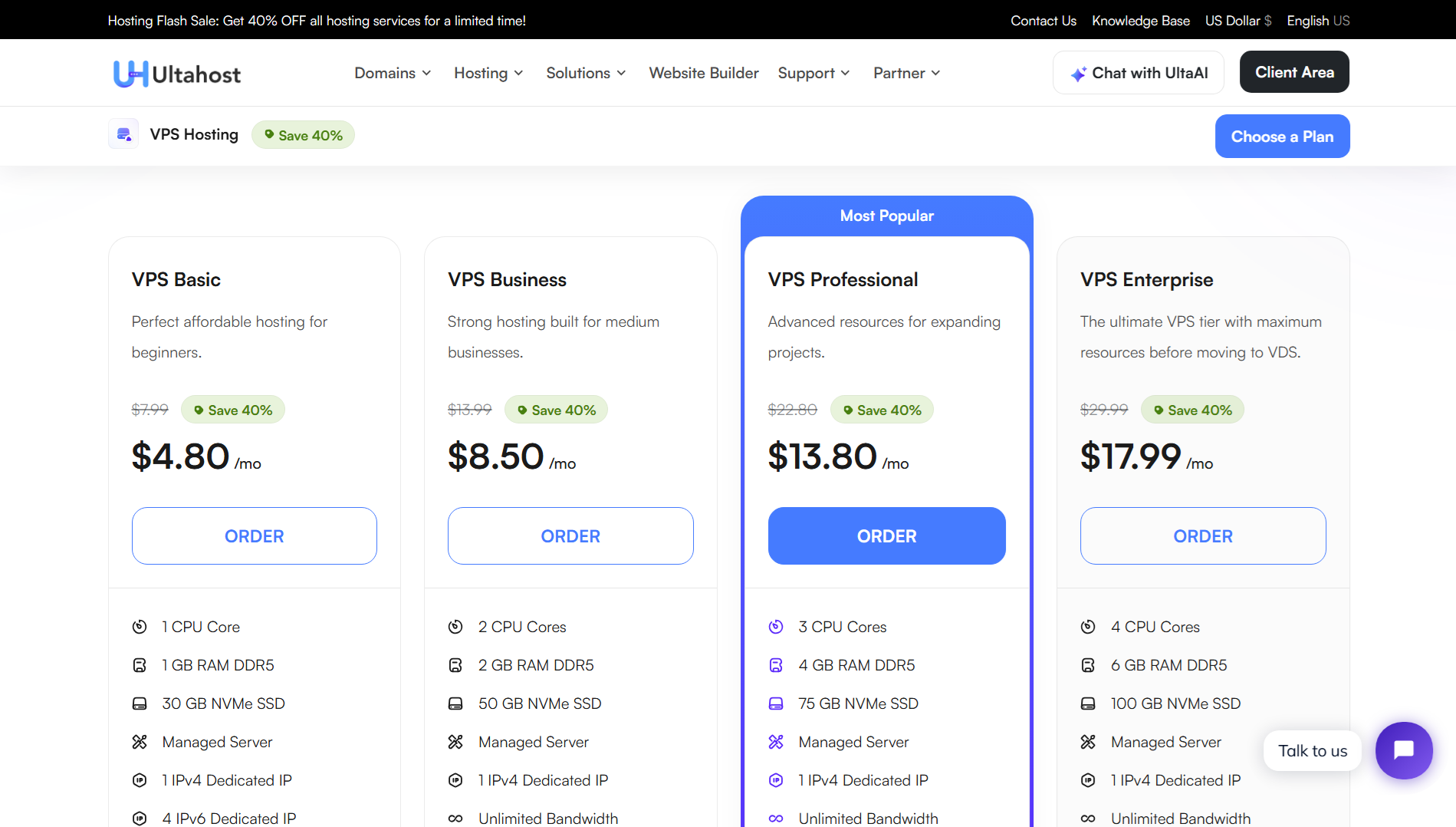
UltaHost VPS Plans
7. Contabo (25 Outbound Emails per Minute)

Contabo’s VPS offerings with open port 25 provide a cost-effective yet powerful solution for email marketers. Using this VPS, I’ve successfully setup mail servers in aaPanel and FastPanel.
The German-based hosting provider emphasizes performance with high-speed SSDs and robust hardware.
Contabo’s VPS plans include unlimited traffic, making it an ideal choice for cold email campaigns with varying audience sizes. This provider also offers a user-friendly control panel, ensuring a seamless experience for users with different levels of technical expertise.
Explore the features of Contabo VPS offerings:
Features
- Powerful hardware for optimal performance.
- Unlimited traffic for data-intensive applications.
- Wide selection of operating systems.
- Affordable pricing with no setup fees.
Additional Features
Dedicated CPU and RAM: Contabo’s VPS plans come with dedicated CPU and RAM resources, ensuring consistent and reliable performance even during peak usage.
IPv6 Support: Contabo supports IPv6, enabling users to leverage the latest Internet Protocol for improved connectivity and addressing.
Full Root Access: Contabo provides full root access, allowing users to have complete control over their server configurations and installations.
One-Click Application Installation: Contabo offers one-click installations for popular applications and software, streamlining the process of setting up and managing websites.
Payment Methods
- Credit/Debit Cards (Visa, MasterCard)
- PayPal
Contabo VPS Plans

8. CloudBlast (Unlimited Outbound Emails)
CloudBlast.io is a Dubai-based cloud hosting provider offering high-performance VPS solutions at competitive prices. Their primary data center is located in Amsterdam, Netherlands (Equinix AM5), with planned expansions into Singapore and New York.
Port 25 Accessibility
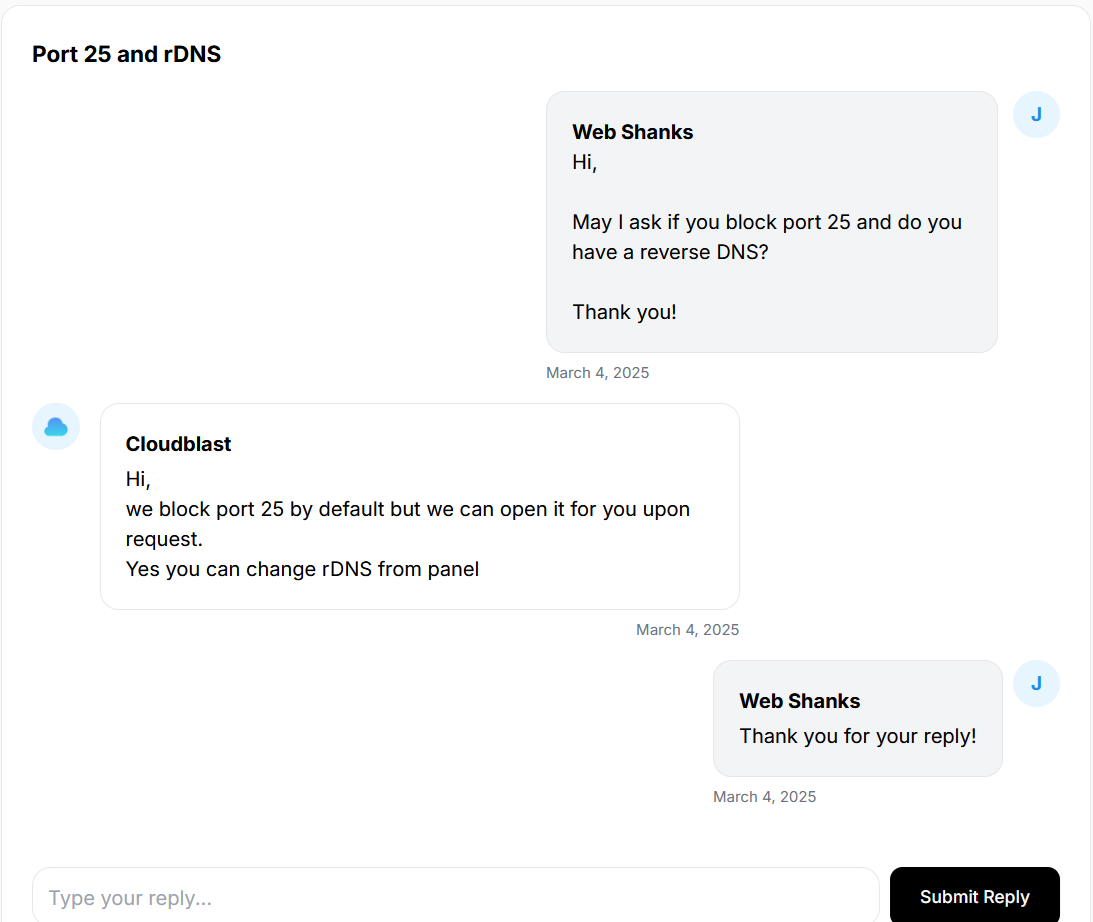
By default, CloudBlast.io blocks port 25 to prevent abuse, but users can request its activation for legitimate email services. This approach ensures security while maintaining flexibility.
Features
- Open Port 25
- Hourly bill
- Netherlands Data Centers
- NVMe SSD storage and RAID arrays for data protection and speed
- Full Root access
- Advanced DDoS protection
- Daily backups
Data Centers & Network
Currently operating in the Netherlands, CloudBlast.io provides 10 Gbps bandwidth with DDoS protection. Future locations in Singapore and New York will further improve global coverage and latency.
Payment Methods
CloudBlast.io supports a variety of payment options, including:
- Cryptocurrencies
- Credit Cards
- AliPay
- Over 20 local payment methods
Note: In order to deploy a server, you must deposit at least €10.
Reverse DNS Support
The platform offers reverse DNS (rDNS), an essential feature for users running mail servers or needing domain verification.
User Experience & Reliability
While CloudBlast.io’s affordability and features are praised, some users report reliability concerns, including occasional downtime affecting business operations.
CloudBlast.io is an appealing choice for users seeking cost-effective VPS solutions with strong network performance, flexible payments, and rDNS support.
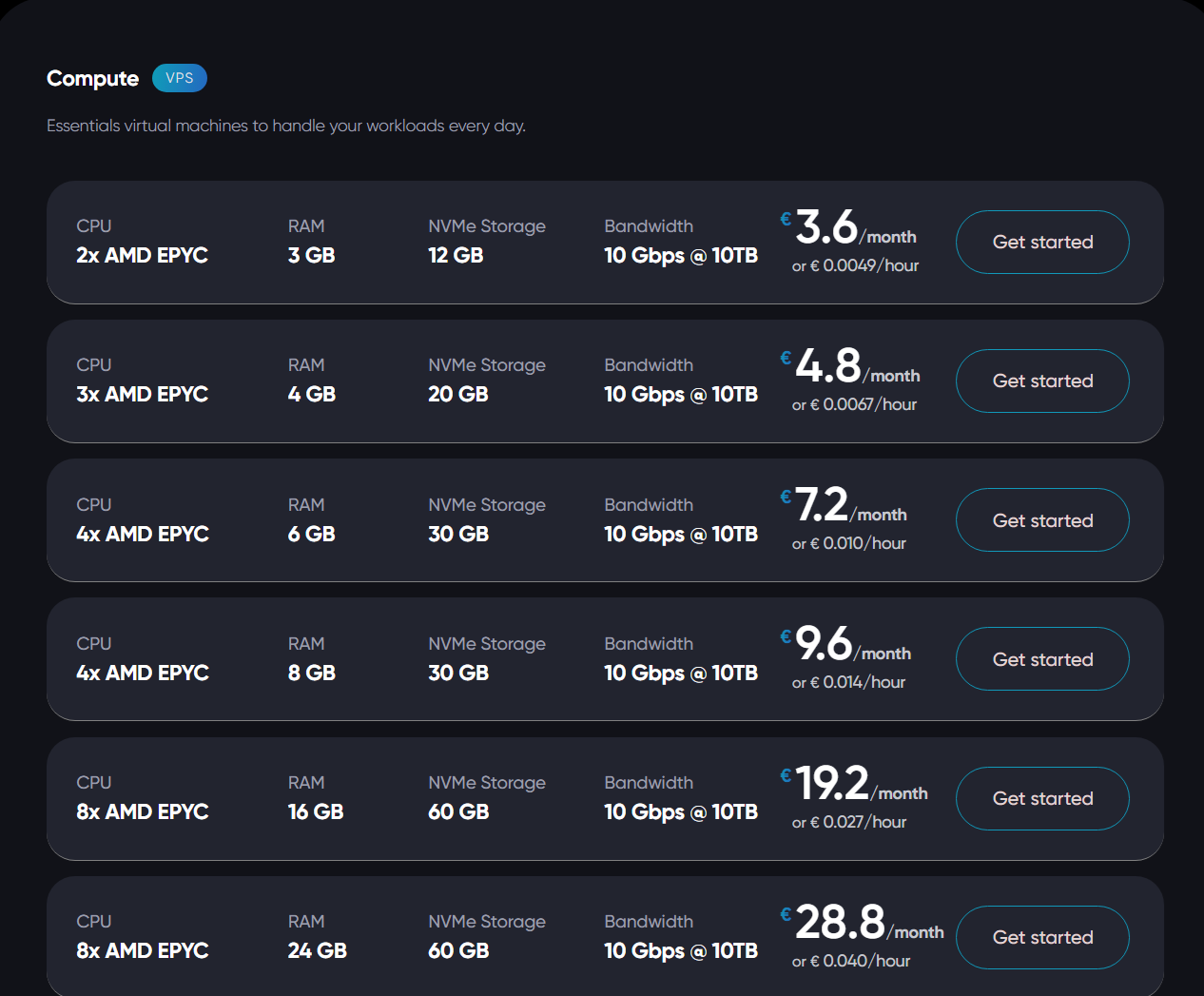
CloudBlast Plans
9. AvaHosting (Unlimited Outbound Email)
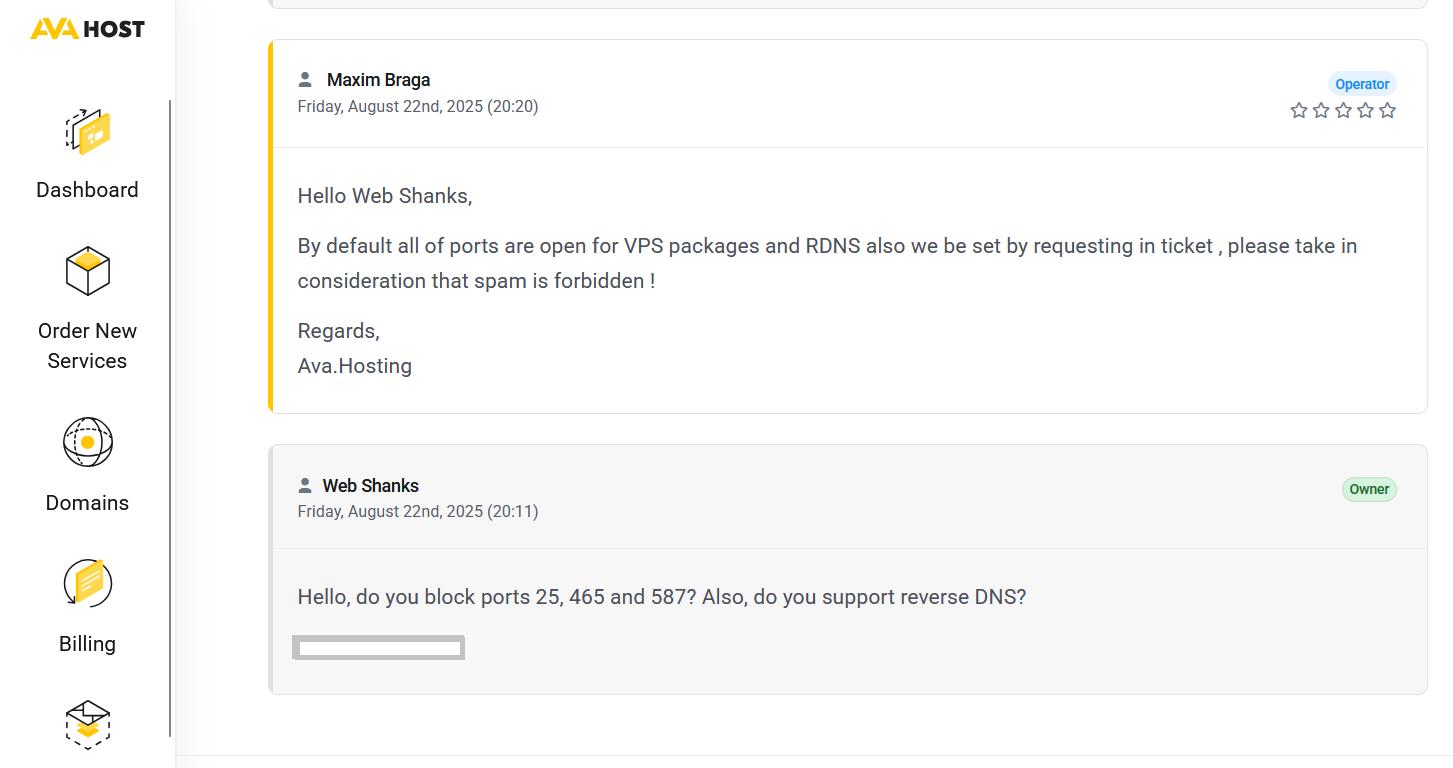
AvaHosting has been around for a while, and they don’t block any ports, especially port 25.
If you’re considering Ava Hosting for your VPS or dedicated server, understanding how port 25 works and how AvaHosting handles it will help you make the right decision.
Unlike many hosting companies that block port 25 by default (to prevent spam), AvaHosting offers flexible VPS and dedicated server solutions. Their VPS plans come with full administrative access, meaning you can configure services like SMTP on your own.
Watch this video on how to setup your AvaHosting VPS.
Community feedback and AvaHost’s own responses on forums suggest that port 25 can be enabled, especially on VPS plans, for legitimate use cases such as:
-
Running your own mail server
-
Email relay for business domains
-
Transactional email sending
For client-side email submission (e.g., from your website or application), it’s still better to use port 587 or 465 for encryption and deliverability.
Features
- Port 25, 456, 587 open
- NVMe SSD Storage
- 99.9% Uptime Guarantee
- Unlimited Bandwidth
- Root Access
- DDoS protection
- Free SSL Certificates
AvaHosting’s data center is quite unique—and a highlight worth noting:
- Located in Chișinău, Republic of Moldova, in a repurposed underground former bomb shelter situated 5 meters below ground.
Payment Methods Accepted by AvaHosting
-
PayPal
-
Credit & Debit Cards (e.g. Visa, MasterCard)
-
Cryptocurrency
- Additional regional options like Card RU, Qiwi, YooMoney, and WMZ WebMoney
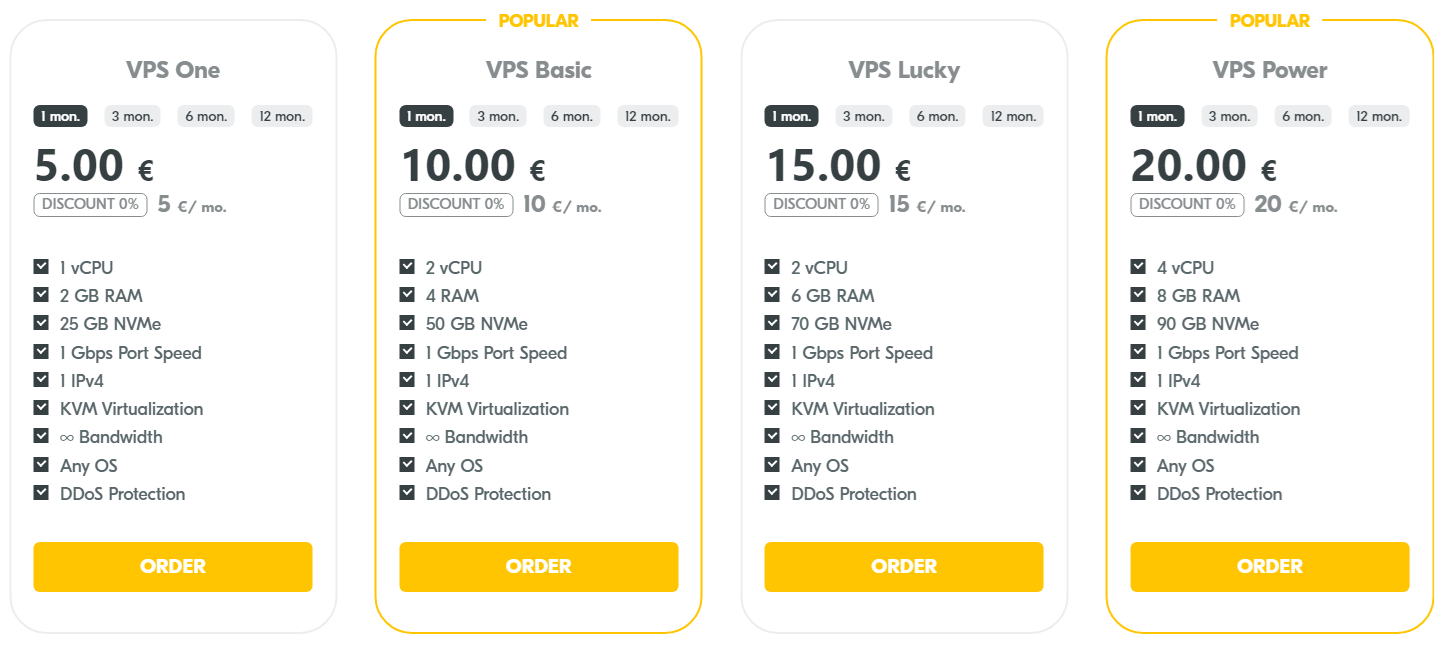
AvaHosting VPS Plans
AvaHost offers a broad range of VPS services to suit different needs:
10. Hostinger (5 Outbound Emails per Minute)
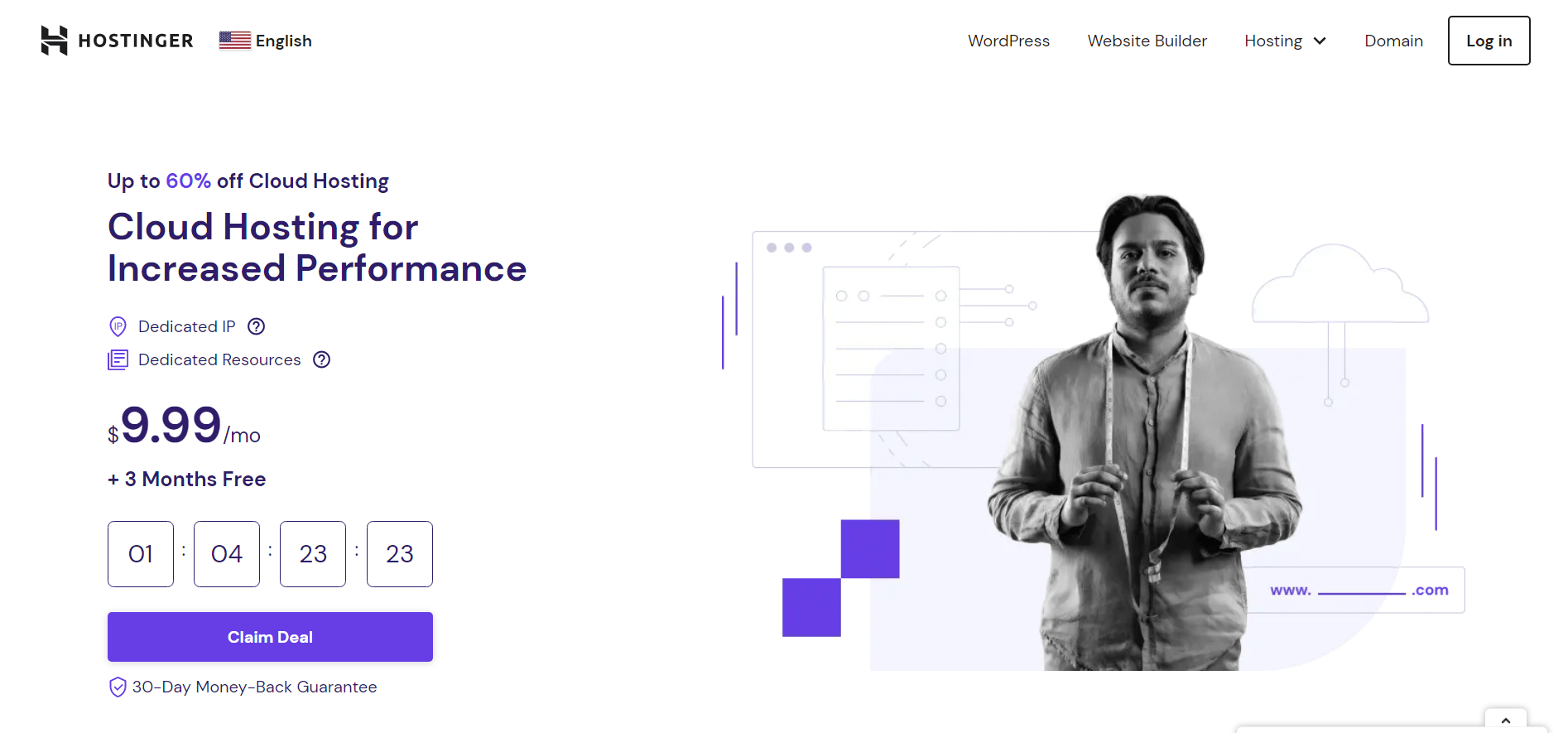
Hostinger’s VPS services with open port 25 provide a reliable foundation for your email marketing endeavors. The hosting giant offers a feature-rich environment with dedicated resources, including a custom control panel for easy management.
Hostinger’s VPS plans come with SSD storage, a 99.9% uptime guarantee, and a global content delivery network (CDN) for improved performance. With their scalable solutions, you can adapt your resources to match the evolving needs of your email campaigns.
How to use Hostinger? Check out this tutorial.
Features
- Full root access.
- Custom control panel for easy management.
- SSD storage for faster data retrieval.
- Dedicated IP addresses for enhanced security.
- Seamless scalability to accommodate growing business needs.
- Open 25, 587 ports

Additional Features
Website Builder: Hostinger includes a website builder with its hosting plans, making it convenient for users to create and launch their websites without extensive coding knowledge.
Global Server Presence: Hostinger has servers strategically located worldwide, allowing users to choose server locations close to their target audience for improved website loading speeds.
Free SSL Certificate: Hostinger provides a free SSL certificate, enhancing the security of websites and ensuring encrypted data transmission between the server and users.
WordPress Optimized Hosting: Hostinger offers hosting optimized for WordPress, including one-click WordPress installations and specialized support for WordPress-related issues.
Payment Methods
- Credit/Debit Cards (Visa, MasterCard)
- PayPal
- Apple Pay
- Google Pay
- AliPay
- Cryptocurrency
Hostinger VPS Plans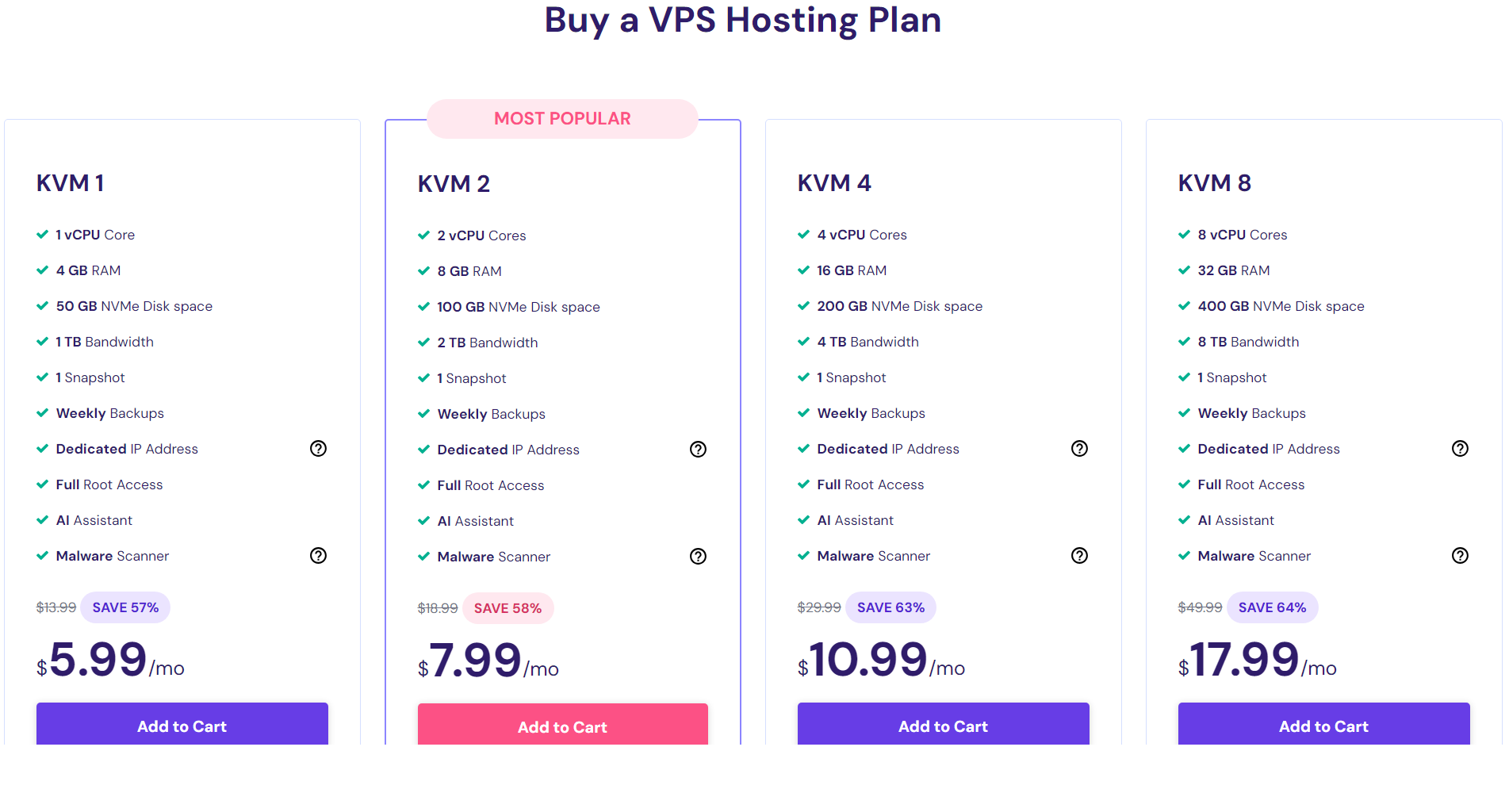
Frequently Asked Questions (FAQ)
Why is an open port 25 important for email marketing on a VPS?
Port 25 is crucial for outbound email traffic. It allows your VPS to send emails to external servers, ensuring the successful delivery of your email campaigns.
What is the significance of inbound and outbound email in email marketing?
Inbound email refers to messages your server receives, while outbound email pertains to messages sent from your server. In email marketing, both are crucial for effective communication with your audience.
Are there any limitations when using a VPS with open port 25?
Some hosting providers may restrict the number of outgoing emails to prevent spam. It’s essential to check the terms of service of your chosen provider.
Can I use any VPS provider for email marketing?
While many VPS providers allow email marketing, it’s essential to check their policies and ensure compliance with anti-spam regulations.
Do these VPS providers offer additional security measures for email campaigns?
Yes, many of these providers offer DDoS protection, firewalls, and other security features to safeguard your email campaigns and ensure reliable delivery.
What security measures should I take when using a VPS for email marketing?
Implementing SSL/TLS encryption, regularly updating software, and using strong authentication methods are essential for securing your email marketing activities on a VPS.
Can I upgrade my VPS resources if my email marketing needs grow?
Most providers offer scalable VPS plans, allowing you to easily upgrade your resources as your email marketing requirements expand.
Conclusion
In conclusion, the choice of a VPS with open port 25 plays a pivotal role in the success of your email marketing campaigns.
Each hosting provider reviewed – isHosting, RackNerd, Hostinger, EUGameHost, Contabo, CloudBlast, and UltaHost – brings its unique set of features to the table. Consider your specific needs, budget, and technical requirements when selecting the ideal VPS for your email marketing endeavors.
Among these VPS providers, I’ve used RackNerd, UniHost, Contabo, and Hostinger to setup email servers for my clients that can send cold emails. So far, I haven’t encountered problems using these providers in cold email marketing.
Lastly, take good care of your server. Monitor your IP’s reputation and please DO NOT spam 🚫.

Forget Hostwinds in 2024
i asked twice before order if i can use port 25. support told me yes.
the i ordered, installed cyberpanel and got the massage, that my provider blocked port 25!
after opened a ticket to ask whats wrong, Hostwinds Abuse Department answered me:
Your account service signup/activities were detected as suspicious by our system. To protect the IP reputation of our network and as a proactive measure to prevent our IP space from being used to distribute unsolicited e-mail(s), Hostwinds reserves the right to apply an SMTP filter as a precaution to accounts flagged by our Abuse Team. Due to this, the SMTP port on your servers has been disabled through a filter placed on your account. This prevents further emails from being sent out from your server.
We cannot remove the current restrictions that are applied to your account.
As of now, you will need to submit a request after 90 days have passed since the infraction for the consideration of this removal.
Ridiculous, sorry….absolutely not recommended
Sorry to hear that. They also told me they open their port 25. Is your domain new and have you installed CyberPanel email server? Did you send email messages after installing?
DartNode is blocking port 25
You can contact them if it is closed and reopen it for you. Mine is open by default.
Hi really loved your content. It’s very comprehensive and beginner-friendly. I was wondering if you are open to reviewing a new VPS provider?
I found this quite cheap VPS provider with good specs but I am contemplating migrating to this.
I want to know if port 25, 465 and 587 are open and your mode of payment, i do pay with perfect money, and i need the vps to have centos7 installed on it and postfix as well or sendmail.
I don’t know VPS with open port 25 that accepts perfect money, only crypto.
@Nevett Colin i have already paid greencloud vps with port 25 opened and i accept perfect money for payment.
What About OVH Cloud and hetzner can you provide information on them??
They require passport for verification. It’s not straightforward when setting server with them.
Hetzner
please how can i know the email outbound and inbound on a server
Can you please elaborate?
what i mean is how can i know the amount of email a server can send out daily
It depends on your VPS’s SMTP connection limit.
Please how can i know the connection limit on the vps
You need to contact your VPS provider in order to know the SMTP limit. Their policies may change from time to time.
Hostinger is not an option,
They limits the usage of port 25 by 5 messages per minute.
Even sending a ticket they do not allow increasing the limit.
https://support.hostinger.com/en/articles/7854530-is-smtp-port-25-blocked-on-vps
Yes. It should be only used for personal use or small transaction marketing.
When Contabo detects and closes the account, can we create a new account to buy VPS with PayPal? Or will they check the IP address of our PC? I mean, do I need to use a different IP location to open a new account in Contabo?
Yes, you need to create other account with different IP, as well as name and address.
hello webshanks, did verpex still provide vps with open port 25 by default I checked your list and I saw that you removed it!
I bought vps and I tested it, my domain name got blacklisted after only sending 2 emails to mail tester services, I requested from spamhouse to delist my domain name and they replied me with this:
Is in an Internet neighbourhood with “poor reputation” that has shared (or inevitably will share) its negative reputation with your domain. This may be due to the DNS server, the hosting service, the IPs used, or some combination of these and other factors.
Yes they still open their port. Did you check your IP for blacklist after getting their VPS?
I checked it was clean when I bought the vps but it got blacklisted quickly, after a while I requested from spamhouse to delist it and they did but for the domain name they won’t delist it because it was linked to an Internet neighbourhood with “poor reputation”.
If it is UCEPROTECT, just ignore it. They’re known for scamming hosting companies.
Hello, Racknerd only sends 100 emails per hour; it’s not unlimited.
I contacted the sales department before buying.
So far I can send more than 100.