
 If you’re anything like me, setting up your own mail server felt like diving into the deep end of the internet. I’ve been down that rabbit hole — command lines, DNS records, hours of scratching my head wondering why my emails end up in spam. It’s a learning curve, but a rewarding one.
One of the most common roadblocks people hit when self-hosting email is understanding the trio of SPF, DKIM, and DMARC — plus the all-important MX record. These aren’t just acronyms to skim past — they’re the backbone of email deliverability and sender reputation.
Let’s break them down in plain English, so you can stop your emails from disappearing into the spam void and start building a bulletproof mail server.
First Things First: What Is an MX Record?
MX stands for Mail Exchange. This DNS record tells the internet which server is responsible for receiving email on behalf of your domain.
Think of it this way:
Imagine your domain is a business and the MX record is the receptionist. When someone sends an email to [email protected], the sender’s mail server looks up your domain’s MX record to figure out where to deliver the message.
Why it matters:
No MX record = no email delivery. Simple as that.
Real-life tip:
Always double-check your MX records after setting up a mail server. Use tools like MXToolbox to confirm everything is resolving correctly.
Example:
If your DNS settings have this line:
@ IN MX 10 mail.webshanks.com
It means: “Hey internet! Deliver my email to the mail server at mail.webshanks.com.”
What Mail Servers Use It?
Every mail server uses MX records. Whether you’re running Postfix, Exim, or even Google Workspace — without an MX record, no one knows where to send your mail.
🧪 Test your MX record using our MX Lookup tool.
SPF, DKIM, and DMARC Explained: The Beginner’s Guide to Email Authentication
If you’ve ever set up your own email server, you’ve probably run into three acronyms that seem to follow you everywhere: SPF, DKIM, and DMARC. They show up in setup guides, they show up in error logs, and they show up right before Gmail decides your carefully crafted email belongs in someone’s spam folder.
Here’s the thing nobody tells you when you’re starting out: these three records aren’t optional extras. They’re the reason mail servers trust each other at all. Without them, email would be even more of a spam-riddled mess than it already is. With them, you’re basically handing receiving mail servers a signed ID card that says “yes, this email really is from who it claims to be.”
This guide walks through what each one actually does, how the checks work under the hood, and how they fit together — written for someone setting up their first mail server, not someone who already has a CS degree in cryptography.
Why Email Needed Authentication in the First Place
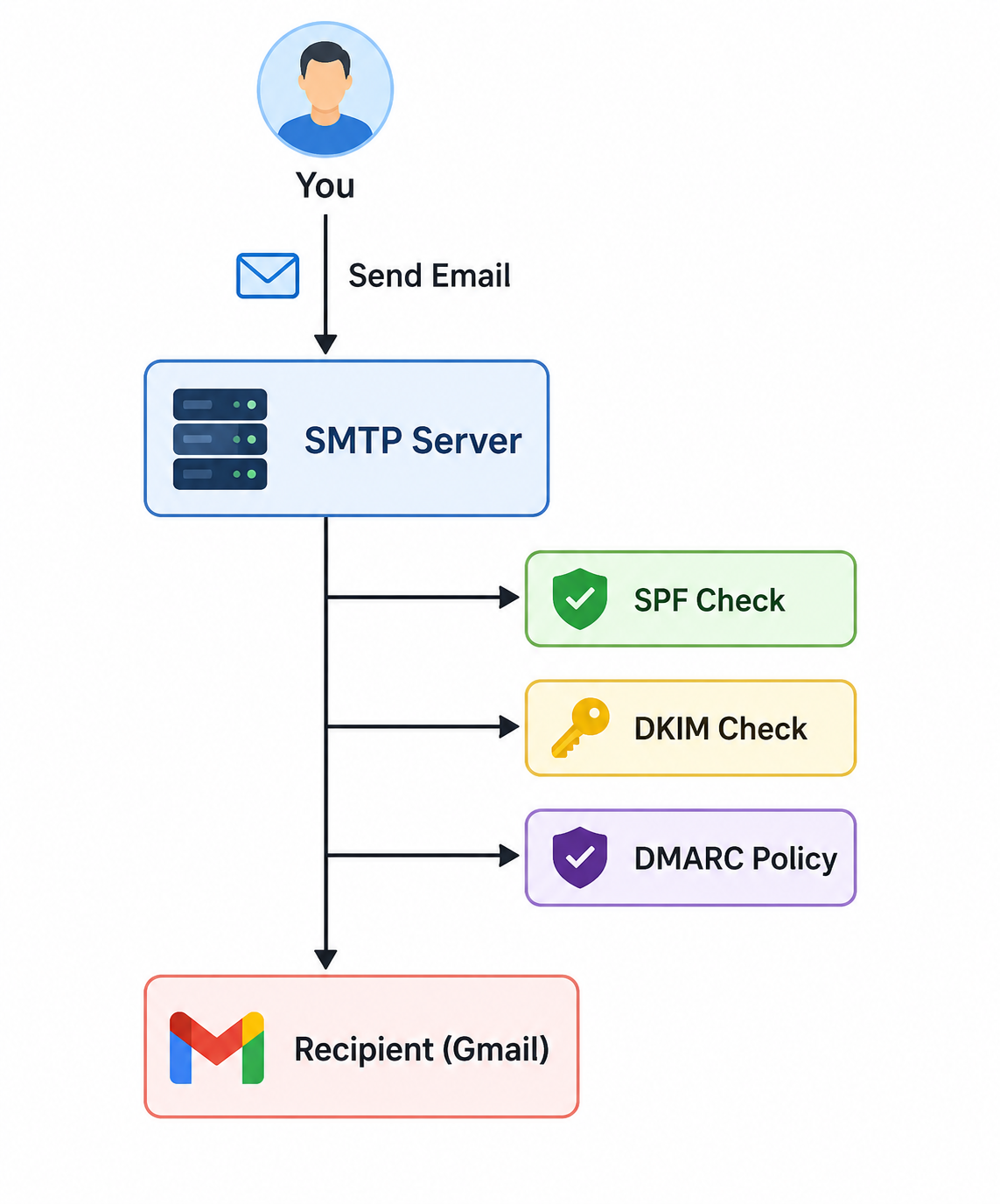
Email as a protocol was built in the early 1980s, long before spam and phishing were a problem. SMTP (the protocol that moves email around) has no built-in way to verify that the sender is who they claim to be. Anyone can set the “From” field to whatever they want. This is exactly why phishing emails pretending to be your bank work so well — there was never a lock on the front door.
SPF, DKIM, and DMARC were created, one after another, to patch this hole. Each one solves a different piece of the puzzle, and together they let a receiving server (like Gmail, Outlook, or your own self-hosted mail server) answer three questions:
- Did this email come from a server that’s actually allowed to send mail for this domain? (SPF)
- Was this email tampered with in transit, and does it really originate from this domain? (DKIM)
- What should I do if SPF or DKIM fail, and who do I tell about it? (DMARC)
Let’s take them one at a time.
SPF: Sender Policy Framework
SPF is the simplest of the three, and it’s usually the first one people set up. Think of it as a guest list you publish for your domain: “here are the only servers allowed to send email claiming to be from me.”
🧪 Test your SPF using our SPF Checker Tool.
How it actually works
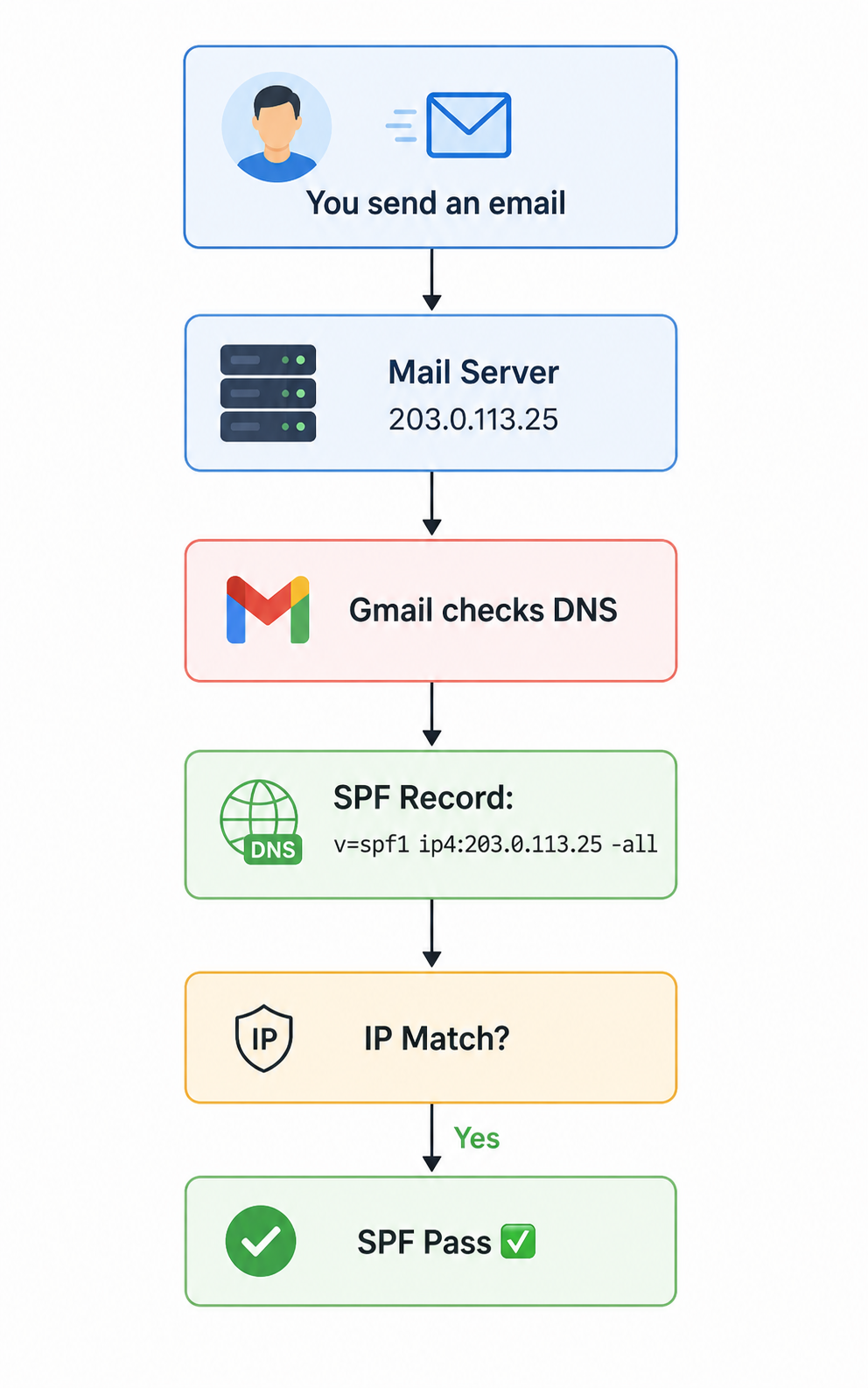
When you set up SPF, you add a TXT record to your domain’s DNS. It looks something like this:
v=spf1 ip4:192.0.2.1 include:_spf.google.com ~all
Let’s break that down piece by piece:
v=spf1— This tells the receiving server “this is an SPF record, version 1.”ip4:192.0.2.1— This whitelists a specific IP address that’s allowed to send mail for your domain. This would be your VPS’s IP address if you’re running your own mail server.include:_spf.google.com— This says “also trust whatever servers Google’s own SPF record trusts,” which is useful if you’re also sending through Google Workspace or a service that relays through Google.~all— This is the catch-all rule for anyone not listed above.~allmeans “soft fail” (flag it as suspicious but don’t necessarily reject it), while-allmeans “hard fail” (reject it outright). Most guides recommend starting with~allwhile you’re testing, then moving to-allonce you’re confident everything’s configured correctly.
What happens when an email arrives
When a receiving mail server gets an email claiming to be from yourdomain.com, it does the following:
- It looks at the “envelope sender” (technically the
MAIL FROMaddress used during the SMTP conversation, which is slightly different from the visible “From” header, though they’re usually the same domain). - It looks up the SPF TXT record for that domain.
- It checks whether the IP address the email actually arrived from is listed in that record.
- If it matches, SPF passes. If not, depending on the
allrule, the email gets flagged, quarantined, or rejected.
The catch with SPF
SPF has one big limitation: it only checks the sending server’s IP, not the actual content of the email. It also breaks easily when email gets forwarded, because the forwarding server’s IP usually isn’t in the original domain’s SPF record. This is one reason SPF alone was never enough — which is where DKIM comes in.
If you’re running a self-hosted setup like Mailcow, iRedMail, or Docker Mailserver, SPF is usually the very first DNS record the setup wizard asks you to add.
DKIM: DomainKeys Identified Mail
If SPF is a guest list, DKIM is a wax seal on a letter. It proves two things: that the email genuinely came from your domain, and that nobody altered its contents along the way.
🧪 Test your DKIM using our DKIM Checker Tool.
How DKIM actually works
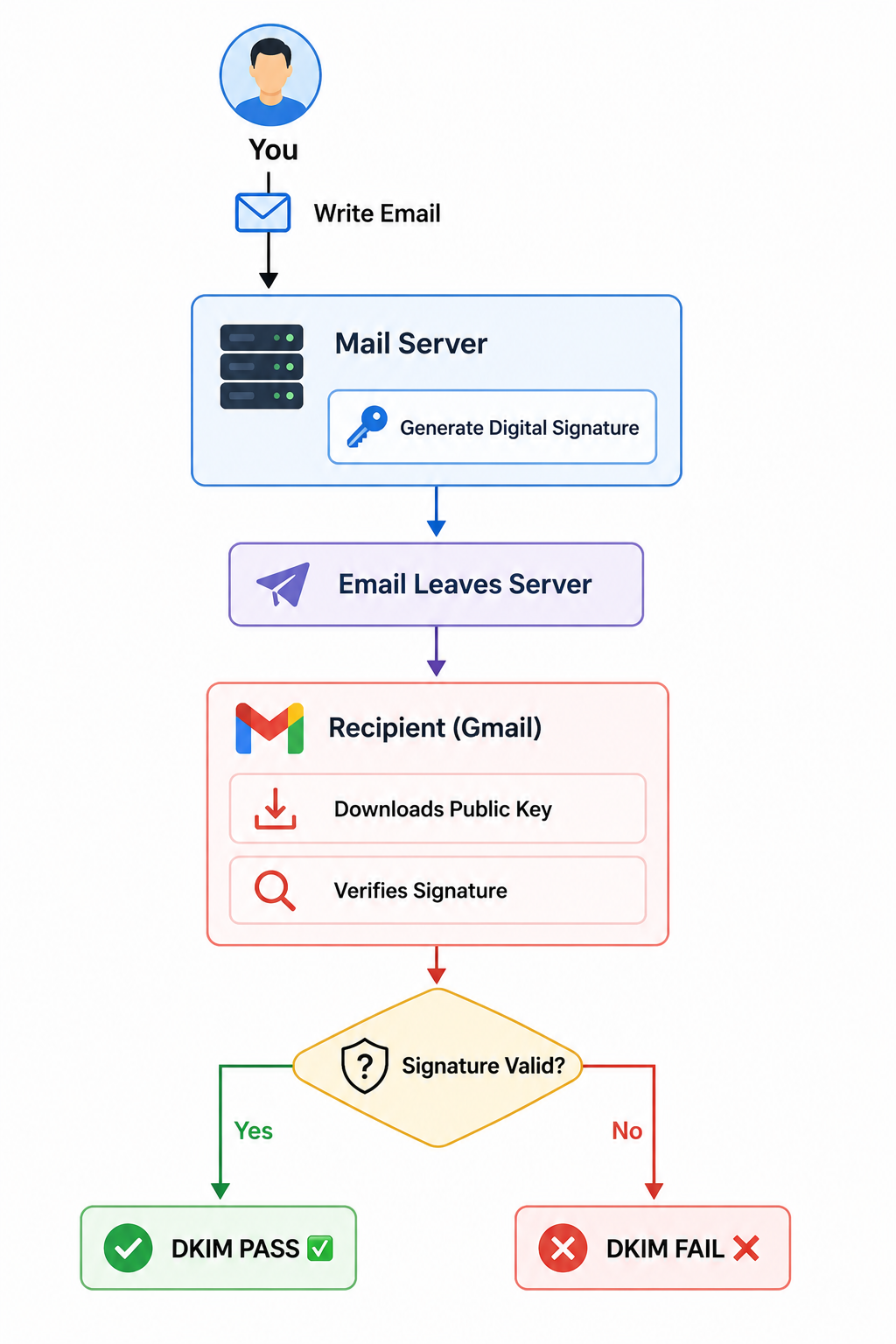
DKIM uses public-key cryptography — the same basic idea behind SSH keys or HTTPS certificates. Here’s the process:
- Key generation. Your mail server (or mail server software) generates a public/private key pair. This is very similar conceptually to generating SSH keys, just applied to email instead of server logins.
- Publishing the public key. The public key gets published in your domain’s DNS as a TXT record, usually at a hostname like
default._domainkey.yourdomain.com(the “default” part is called the “selector,” and you can have multiple selectors for different signing keys). - Signing outgoing mail. Every time your server sends an email, it uses the private key to generate a digital signature based on the contents of specific email headers and the message body. This signature gets added as a new header called
DKIM-Signature. - Verifying incoming mail. When another mail server receives your email, it reads the
DKIM-Signatureheader, figures out which selector and domain to look up, fetches your public key from DNS, and uses it to verify the signature mathematically.
If even a single character of the signed content was changed after signing, the signature won’t verify, and DKIM fails. This is what makes DKIM more powerful than SPF — it’s not just checking “did this come from an approved server,” it’s checking “was this specific message tampered with.”
Why DKIM survives forwarding (mostly)
Because DKIM signs the message content itself rather than checking the sending IP, it tends to survive email forwarding better than SPF does — as long as the forwarding server doesn’t modify the signed headers or body. This is a big reason mail admins consider DKIM the more reliable of the two checks.
Setting DKIM up yourself
Most modern mail server stacks generate the keys and even the DNS record text for you. If you’re using something like Stalwart, Axigen, Modoboa, or Cloudron, the admin panel usually has a dedicated DKIM section that spits out the exact TXT record to paste into your DNS provider.
DMARC: Domain-based Message Authentication, Reporting & Conformance
DMARC is the piece that ties SPF and DKIM together, and it’s the one most beginners skip — which is a mistake, because it’s arguably the most important of the three for actually protecting your domain’s reputation.
🧪 Test your DMARC using our DMARC Checker Tool.
What DMARC adds
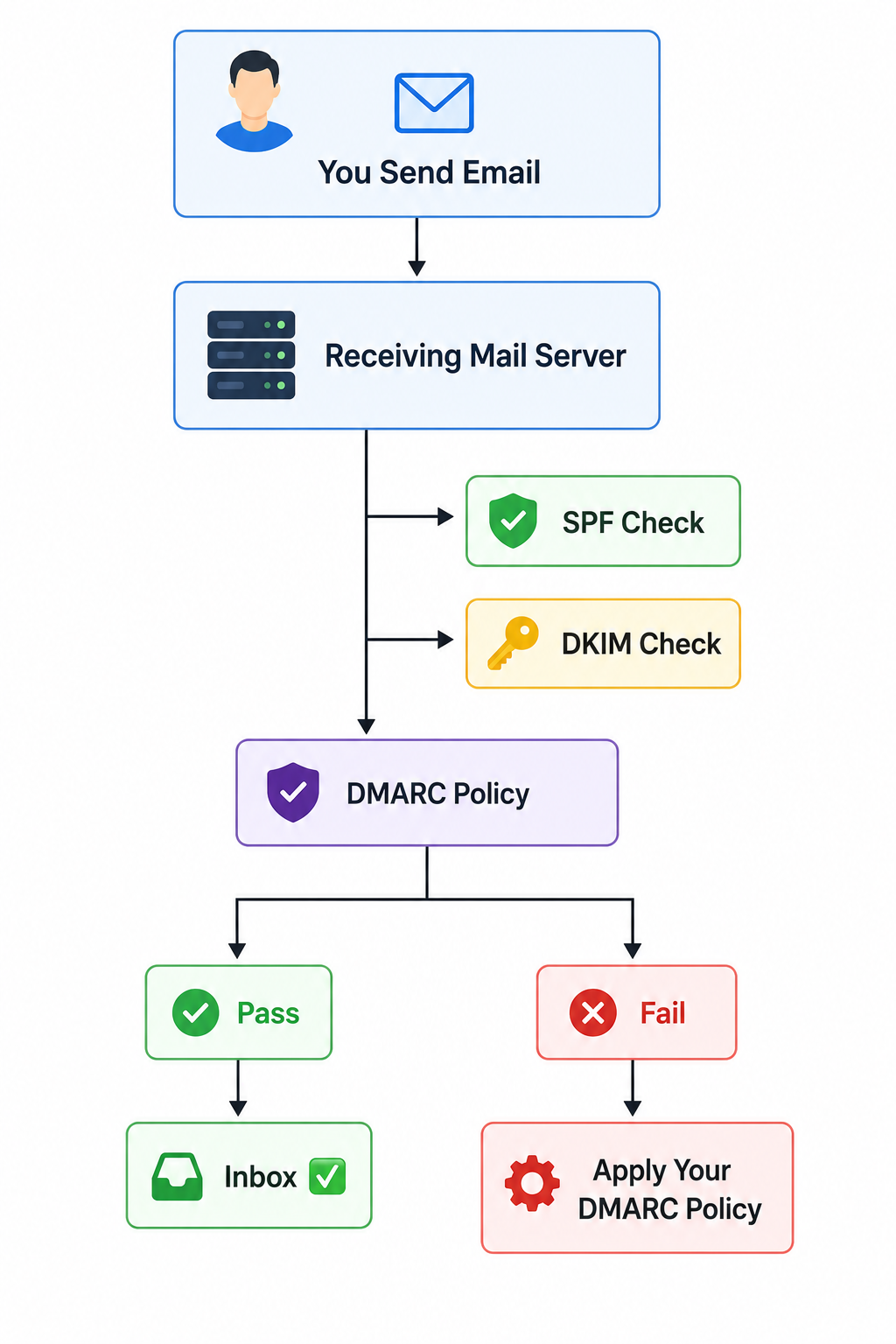
DMARC does three things SPF and DKIM don’t do on their own:
- Alignment checking. DMARC checks that the domain in the visible “From” header actually matches (or “aligns with”) the domain used in SPF and/or DKIM. This closes a sneaky loophole where someone could pass SPF using their own domain but spoof a different domain in the visible From address.
- Policy enforcement. DMARC lets you tell receiving servers exactly what to do when a message fails alignment: do nothing (
p=none), send it to spam (p=quarantine), or reject it outright (p=reject). - Reporting. DMARC lets you request reports from receiving mail providers (like Gmail and Outlook) that tell you who’s sending email using your domain and whether it’s passing or failing checks. This is enormously useful for catching spoofing attempts you’d otherwise never know about.
A typical DMARC record
v=DMARC1; p=quarantine; rua=mailto:[email protected]; pct=100; adkim=s; aspf=s
v=DMARC1— version tag.p=quarantine— the policy: quarantine (spam-folder) anything that fails alignment.p=noneis the safe starting point while testing,p=rejectis the strictest.rua=mailto:...— where to send aggregate reports.pct=100— apply this policy to 100% of failing mail (you can ramp this up gradually from a lower percentage while testing).adkim=s/aspf=s— “strict” alignment mode, meaning the domain has to match exactly rather than just share a parent domain.
Why DMARC matters so much for deliverability
Big providers like Gmail and Yahoo have, in recent years, made DMARC essentially mandatory for anyone sending meaningful volumes of email. If you’re doing anything involving cold email outreach or email warm-up, skipping DMARC is one of the fastest ways to get your entire domain’s reputation tanked, sometimes without you even realizing it’s happening until your open rates mysteriously crater.
How the Three Work Together in Practice
Here’s the full picture of what happens when someone emails you (or when you send an email out):
- The receiving server checks SPF — is the sending IP authorized for this domain?
- The receiving server checks DKIM — does the cryptographic signature verify against the published public key, confirming the message wasn’t altered?
- The receiving server checks DMARC — do the domains used in SPF and/or DKIM actually align with the visible From address, and what policy has the domain owner published for failures?
- Based on all of that, the message gets delivered, sent to spam, or rejected — and if the domain owner requested reports, a summary gets sent back to them.
Notably, DMARC only requires that one of SPF or DKIM pass and align — not both. This is intentional, since forwarding and mailing-list setups can sometimes break one but not the other.
Common Beginner Mistakes
A few things trip up almost everyone the first time they set this up:
- Forgetting to update DNS after changing mail providers. If you migrate from one server to another — say, moving from Contabo to Hostinger, or switching control panels like from CyberPanel to CloudPanel — old SPF entries pointing at the previous IP need to be removed, or you’ll end up with a record that’s technically correct but confusing to maintain.
- Multiple SPF records instead of one merged record. A domain can only have one SPF TXT record. If you need to authorize multiple sending sources, they all go inside a single record using
include:statements. - Jumping straight to
-allorp=reject. Start soft (~allfor SPF,p=nonefor DMARC), watch your reports for a week or two, then tighten once you’re confident nothing legitimate is failing. - Not setting up reverse DNS (PTR records). SPF, DKIM, and DMARC don’t replace the need for proper reverse DNS on your sending IP — most providers still check that too, and it’s usually configured separately at the VPS or hosting provider level.
- Ignoring List-Unsubscribe headers. These aren’t part of the SPF/DKIM/DMARC trio, but Gmail and Yahoo increasingly weigh them alongside authentication for deliverability. It’s worth setting up a proper List-Unsubscribe header once your authentication is solid.
Where to Go From Here
If you’re just getting started with a mail server and want a single reference for how the DNS side fits together — MX records included — it’s worth checking out this walkthrough on email server MX, SPF, DKIM, and DMARC records, which shows the records side by side as they’d actually appear in a DNS zone file.
And if you haven’t picked a mail server stack yet, the good news is that almost every modern option — Mailcow, Mail-in-a-Box, YunoHost, Virtualmin, or ISPConfig — will generate most of these records for you automatically. Your job is mostly to understand what they mean, paste them into your DNS provider correctly, and check back on your DMARC reports every so often to make sure everything’s still aligned.
Once SPF, DKIM, and DMARC are all passing consistently, you’ve done the hard part. The rest — warming up your sending reputation and keeping your bounce rates low — is just patience.

Please can you show us how to build a zimbra powered mail with VPS